Meeting Follow-Up Workflow: A Playbook for Small Teams
Let your note-taker draft the action items, have one person confirm owners and due dates, and send tasks to one list. Add Zapier or Make only for Slack recaps or routing.
Most small teams only need three things after a meeting: AI notes that list the action items, one person who confirms each owner and due date, and a single task list where those tasks land. Start with your note-taker's built-in task integration (for example Fireflies to Asana). Add Zapier or Make only when you want a Slack recap, routing by owner, or a destination the note-taker doesn't support.
We set up the built-in Fireflies → Asana route on team accounts with a synthetic demo meeting, and drafted (but never ran) Zapier and Make versions. Everything else in this playbook is researched from vendor docs.
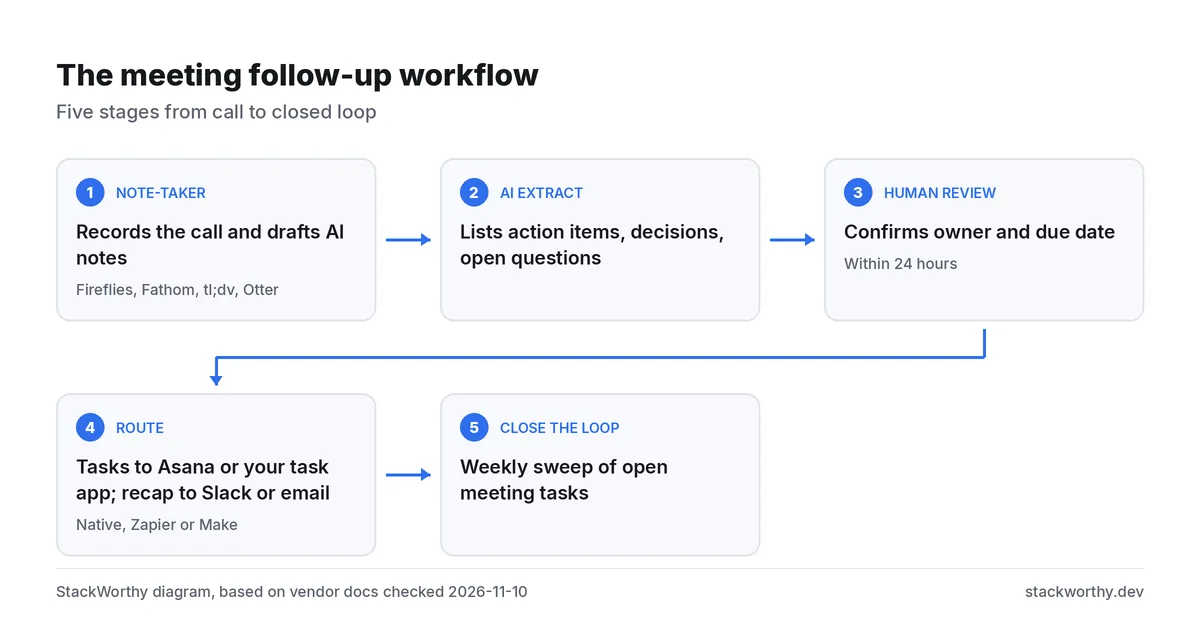
The five-stage follow-up workflow
Action items get lost at the hand-offs, not in the meeting. Give each stage an owner and a rule.
| Stage | What happens | Rule that makes it stick |
|---|---|---|
| 1. Capture | A note-taker records or receives the recording | Use one note-taker for the team, so every meeting lands in the same place |
| 2. Extract | AI drafts notes and a list of action items | Treat the list as a draft. Keep decisions, tasks and open questions apart |
| 3. Review | One person checks each item | Confirm owner and due date within 24 hours; delete anything that isn't a task |
| 4. Route | Tasks go to the task tool; the recap goes to Slack or email | One destination for tasks. The recap links to them instead of copying them |
| 5. Close the loop | Weekly sweep of open meeting tasks | Anything with no owner or date after a week gets reassigned or closed |
The review step is the one most teams skip, and it's the one automation can't replace. AI note-takers can find "Alex will send the wireframe Tuesday," but they don't know that Alex is out next week or that Tuesday means the client's Tuesday.
Stage 1–2: capture and extract
Any of the mainstream note-takers will do the first two stages: Fireflies, Fathom, tl;dv and Otter all record calls and produce AI notes. Our roundup of AI meeting assistants compares them, and the Fireflies vs Otter and Fathom vs tl;dv comparisons cover the free-plan limits in detail.
What matters for follow-up is whether the note-taker can push action items into your task tool on its own. Fireflies' help center says all integrations are available on its Free plan, and its Asana guide describes creating Asana tasks from meeting action items in a project and section you choose.
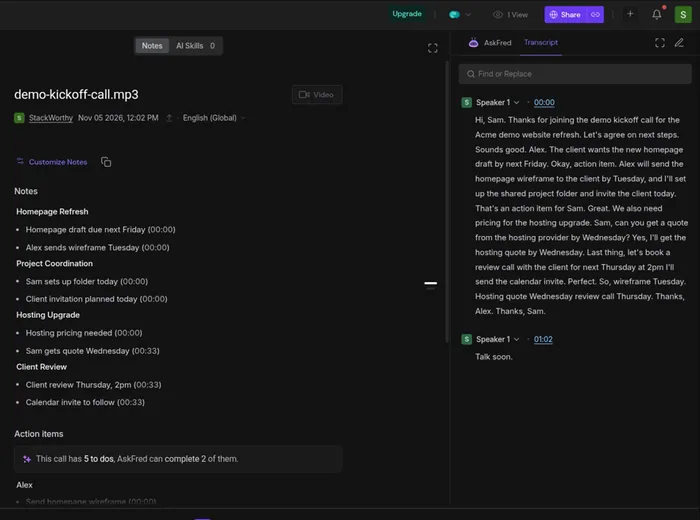
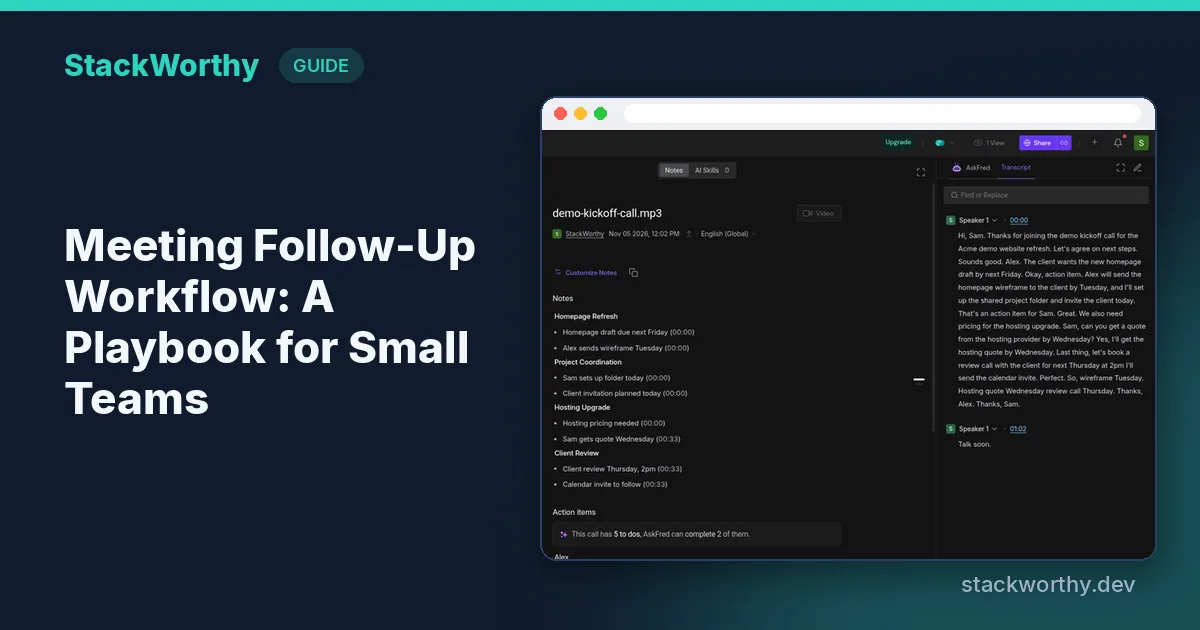
Fireflies notebook for our synthetic demo call: notes by topic, five to-dos, transcript on the right.
The catch on Fireflies Free is AI summaries, not integrations. The pricing page lists "limited AI summaries" and 400 minutes of storage on Free. Free gives you 3 summary credits when you sign up on the web (more if you invite teammates or refer friends); Fireflies doesn't describe a monthly refill. Plan on Pro ($10 per seat a month billed annually, $18 monthly) for unlimited summaries.
What happened when we connected Fireflies to Asana
We connected a team Fireflies Free account to a team Asana project ("Demo Client Onboarding", section "To do") with "Create tasks from meeting action items" on and auto-assign off. Then we uploaded a 63-second synthetic recording of a two-voice kickoff call. No real people or client data were involved.
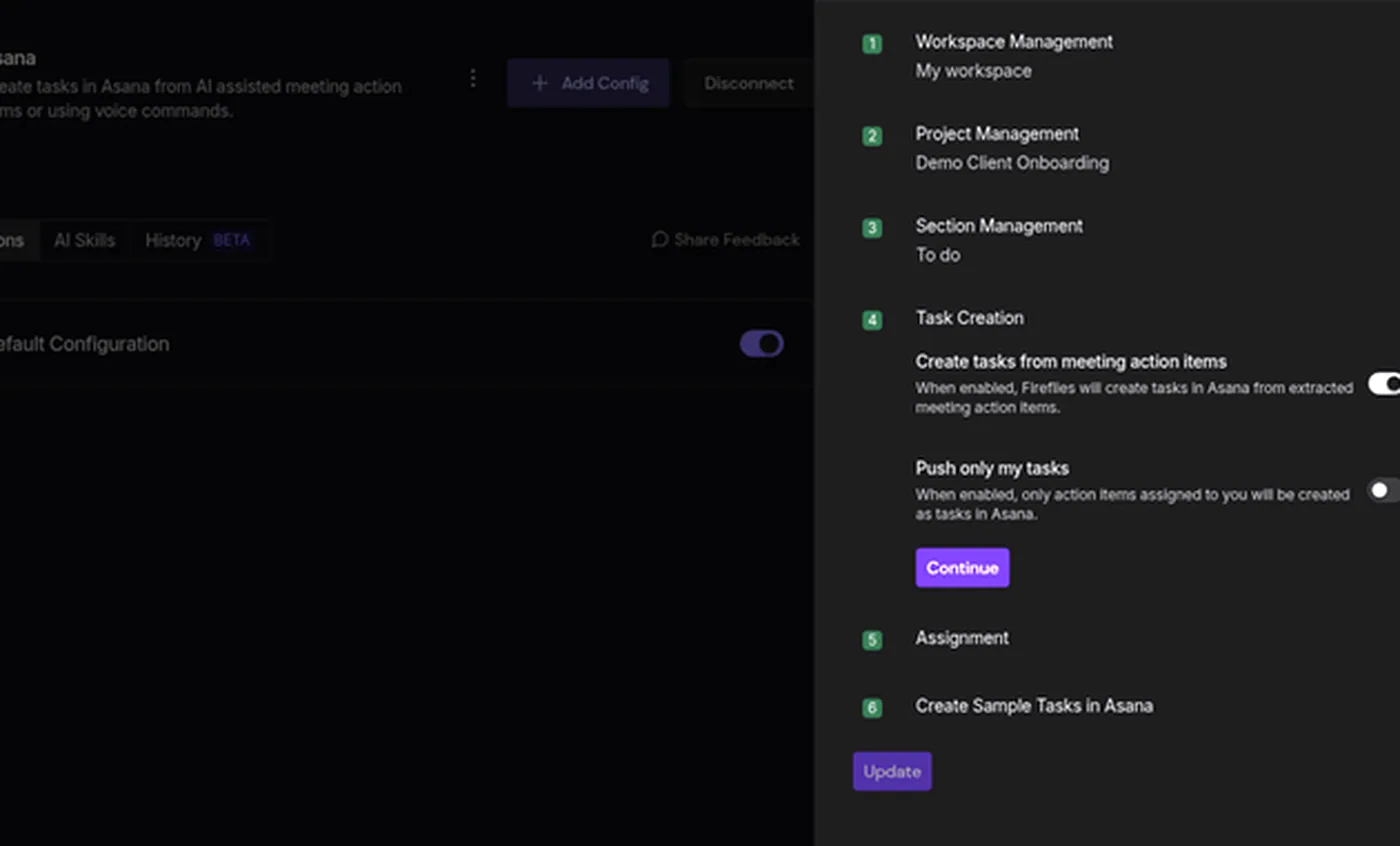
Fireflies → Asana settings for the demo project.
What we saw:
- Fireflies listed 5 action items. The integration created 4 Asana tasks; one item ("Invite client to folder") didn't arrive as a task.
- None of the tasks had an assignee or a due date, even though the call named who would do what and by when. Auto-assign was off, and Fireflies' guide says auto-assign matches the task owner's email to Asana project members.
- Both synthetic voices were labelled "Speaker 1", so speaker names weren't available to route on.
- Each task description held the meeting title, date, links back to the transcript and audio, and the action item text.
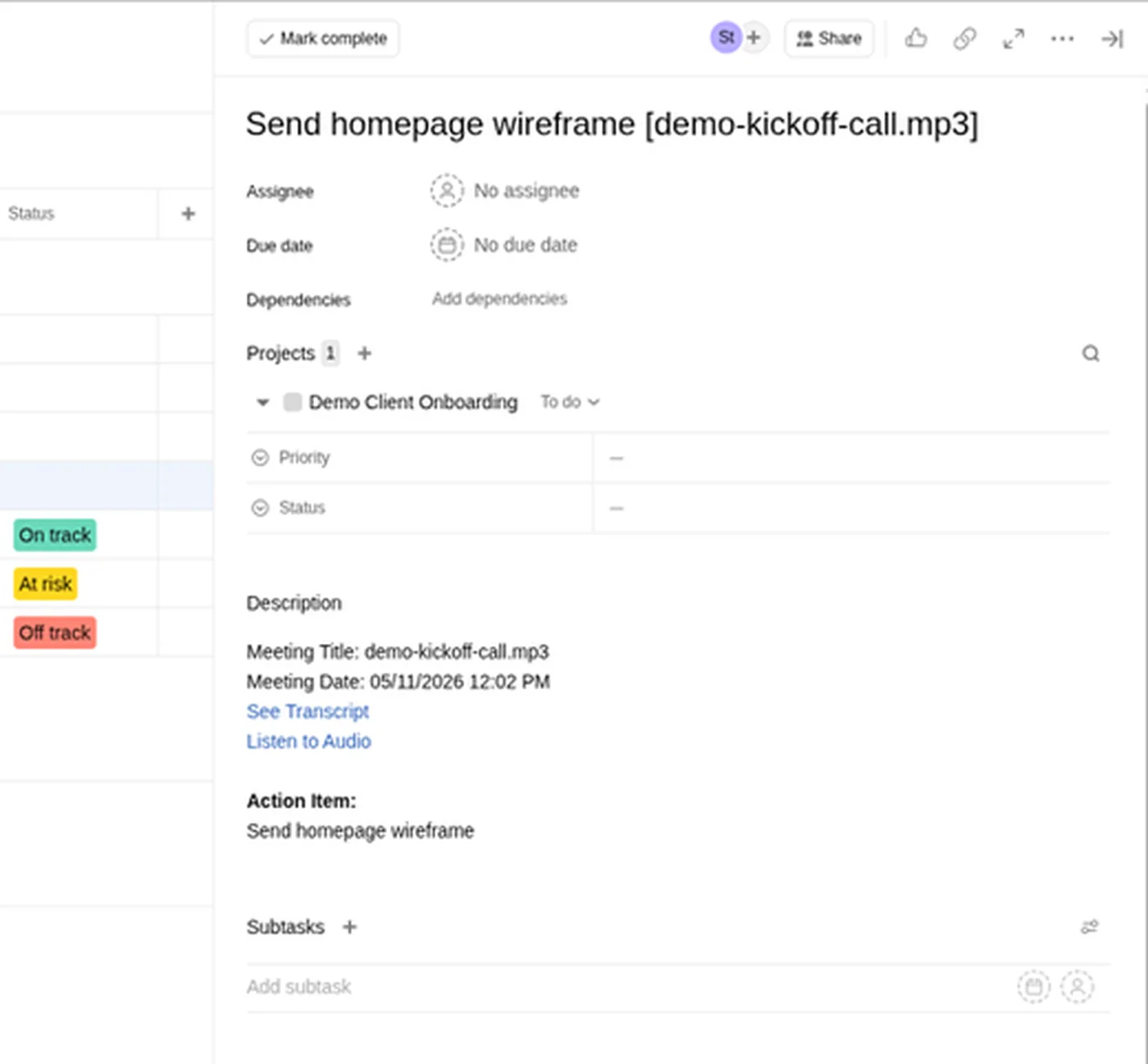
One of the four demo tasks: no assignee, no due date.
That is exactly why stage 3 exists. The integration saves the typing; a person still has to confirm who owns each task and when it's due. Our Asana project ran on an Advanced trial at the time, so treat the Asana screens as representative, not as proof of what Asana's free Personal plan shows.
For the step-by-step setup of this route, see how to turn meeting notes into tasks automatically.
Stage 3: the review rules
Keep these short enough that someone will follow them every time:
- Send AI tasks to a review section, not straight into people's queues. In Asana, that is a section such as "Meeting follow-ups" in the project you pick in the integration.
- One reviewer per meeting, usually whoever ran it. They confirm owner and due date, rewrite vague items ("look into hosting") into tasks someone can finish, and delete duplicates.
- Keep decisions and open questions out of the task list. Decisions go in the recap; open questions get an owner like any task.
- Move each confirmed task out of the review section. Anything still there tomorrow is the reviewer's to chase.
Stage 4: route tasks and the recap
Pick the lightest tier that does the job.
Tier 1: the note-taker's own integration ($0 to start)
Fireflies → Asana is the example above. It needs no extra tool and no extra bill. Limits to know: on Free and Pro, admins get basic workspace-level controls rather than full integration permissions, and Integration Rules (choosing which meetings create tasks, by title, host, participants or meeting type) need Fireflies Business or higher, according to its Asana guide. Without rules, every meeting you record creates tasks, so the review section matters even more.
Tier 2: Zapier or Make, for recaps and routing
Use glue when you want something the built-in integration doesn't do: post a recap to Slack, send tasks to a tool Fireflies doesn't cover, or route items by meeting type.
- Zapier has ready-made Fireflies triggers. Its app page lists New Meeting ("when a new meeting with transcripts and summary is created") and AI Skill. Zapier Free includes two-step Zaps and 100 tasks a month; multi-step Zaps and webhooks start on Professional.
- Make has no Fireflies trigger. Its Fireflies app lists Execute a GraphQL Query, Get a Transcript and List Transcripts, so a scenario has to start from a webhook or a schedule that lists new transcripts. Make's Free plan includes 1,000 credits a month, and most actions use one credit.
We drafted both routes on team accounts but ran neither, so we can't vouch for the results:
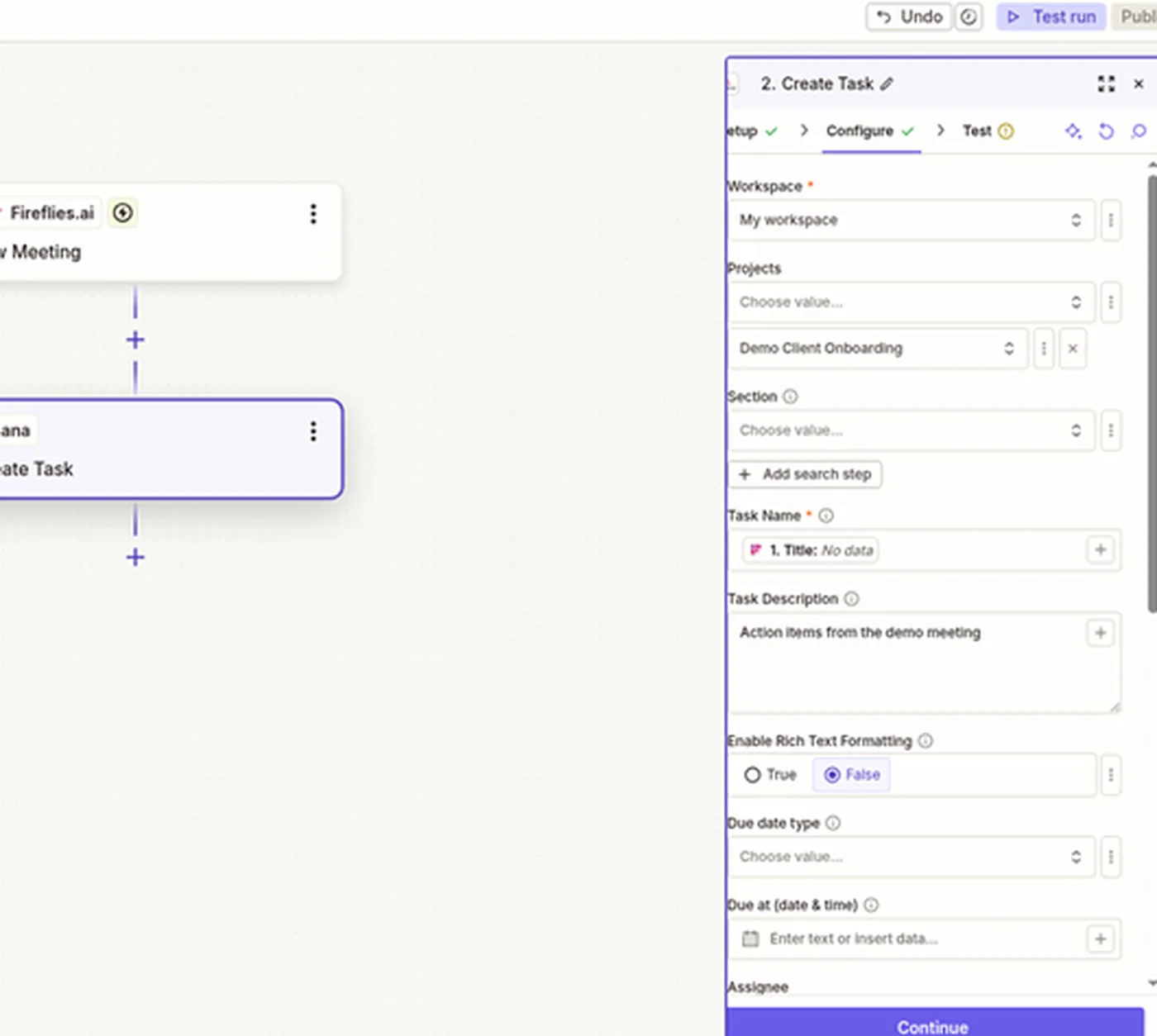
Zapier draft: Fireflies New Meeting → Asana Create Task. Not published; Asana step not tested.
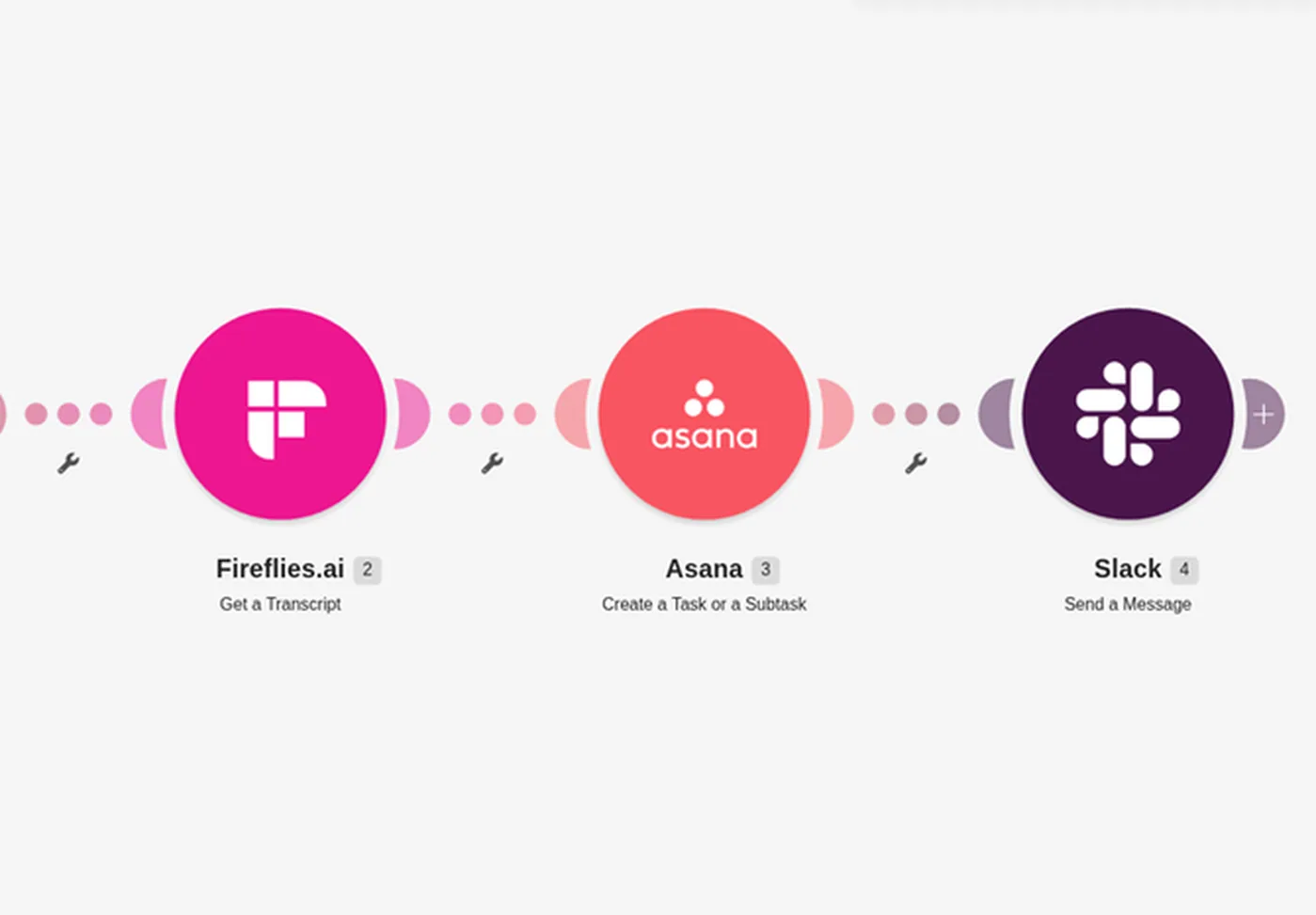
Make scenario: Fireflies Get a Transcript → Asana Create a Task → Slack Send a Message (the Webhook starter is just off the left edge). Configured, never run.
In our unpublished draft (no sample meeting loaded), the only summary field we saw was a Summary URL. Zapier's app docs list a summary-format option for New Meeting, so check the fields after a test pull. A recap that links to the Fireflies notes works either way. Our Zapier vs Make comparison covers the pricing models if you're choosing between them.
Tier 3: Fireflies webhooks, for developers
Fireflies' API docs describe Webhooks V2 with events for meeting.transcribed, meeting.summarized and meeting.bot_joined, delivered for meetings you own. Team-wide webhooks need the Enterprise plan with the Super Admin role. A webhook only tells you which meeting is ready; your code (or a Make scenario) then fetches the summary through the API. Fireflies' pricing page lists API access on Free with lower rate limits than paid plans. We haven't tested webhooks.
Sending the recap to Slack
The simplest pattern: when the meeting summary is ready, post a short message to the project channel with the meeting title, a link to the notes, and a link to the review section. Don't paste every action item into Slack; that creates a second task list nobody updates.
- Zapier: Fireflies New Meeting → Slack message is a two-step Zap, which fits the Free plan's two-step limit.
- Make: a webhook from Fireflies starts the scenario, then Get a Transcript and a Slack module post the message.
- No glue: the reviewer pastes the recap from a saved template after the review. For a team with two or three meetings a week, this is often enough.
Stage 5: the weekly sweep
Once a week, filter your task tool for open tasks that came from meetings (Fireflies' Asana tasks carry the meeting title in the task name, which makes them easy to find).
- No owner or no due date → assign or close.
- Overdue by more than a week → ask the owner, then re-date or close.
- Duplicates from two meetings on the same topic → merge.
Ten minutes on a Friday keeps the review section from becoming a graveyard.
What it costs
Prices checked November 2026; per user a month billed annually unless noted.
| Product | Role in the workflow | Free plan | Paid from |
|---|---|---|---|
| Fireflies | Capture + extract | Free: limited AI summaries, 400 minutes of storage, all integrations | Pro $10 per seat ($18 monthly) |
| Asana | Task destination | Personal $0 for one or two people | Starter $10.99 |
| Zapier | Glue (recap, routing) | Free: 100 tasks/mo, two-step Zaps | Professional from $19.99/mo per account, billed annually ($29.99 monthly) |
| Make | Glue (webhook-started scenarios) | Free: 1,000 credits/mo | See Make's plans |
A two-person team can try tiers 1 and 2 on free plans, but Fireflies Free covers only a few summarized meetings at sign-up, so the first bill most teams hit is Fireflies Pro.
Which setup should you choose?
| If you… | Choose |
|---|---|
| Have a few meetings a week and use Asana | Fireflies' built-in Asana integration plus a review section |
| Want a Slack recap after every call | Add a two-step Zapier Zap (Fireflies New Meeting → Slack) |
| Already run Make for other automations | A webhook-started Make scenario; budget for setup time |
| Need different rules for client and internal calls | Fireflies Business Integration Rules, or Zapier/Make filters |
| Have a developer and want full control | Fireflies Webhooks V2 and the API |
Related: 10 AI automations every solopreneur should set up.
Get the StackWorthy briefing
One short email when tools worth your money change. No spam.
Frequently asked questions
Can AI note-takers create tasks automatically?
Yes. Fireflies, for example, can create Asana tasks from meeting action items through its built-in integration, which its help center says is available on the Free plan. Expect to confirm owners and due dates yourself: in our demo the tasks arrived with neither.
Do I need a paid plan for automatic meeting follow-ups?
You can try it for free: Fireflies Free includes its integrations, Zapier Free includes two-step Zaps, and Make Free includes 1,000 credits a month. Fireflies Free gives you 3 summary credits when you sign up on the web (more if you invite teammates or refer friends) and doesn't describe a monthly refill, so a team running this every week will need Fireflies Pro.
Who should review AI-generated action items?
The person who ran the meeting, within a day. They confirm the owner and due date, rewrite vague items and delete anything that isn't a task.
Native integration, Zapier or Make for meeting follow-ups?
Use the note-taker's native integration for tasks. Add Zapier when you want a Slack recap or extra routing, since it has a ready-made Fireflies New Meeting trigger. Choose Make if you already use it and are comfortable starting scenarios from a webhook, because its Fireflies app has no trigger.
How do I send a meeting recap to Slack automatically?
A two-step Zapier Zap (Fireflies New Meeting → Slack message) is the simplest route. Post the meeting title and links to the notes and task list rather than every action item.