Fathom vs tl;dv: Free Meeting Recorders Compared
Fathom has the more generous free plan; tl;dv keeps your data in Europe and adds multi-meeting AI reports. Here's which one fits your calls.
Pick Fathom if you want a free recorder that keeps working: its free plan includes unlimited recordings, transcripts and AI call summaries. Pick tl;dv if your clients are in the EU or ask where their data lives. tl;dv says all its data centers are in Europe. Its free plan, though, gives full AI notes for only your first 10 meetings.
| Feature | Fathom | tl;dv |
|---|---|---|
| Best for | Solo consultants who want unlimited free call recording | Remote teams that want searchable recordings |
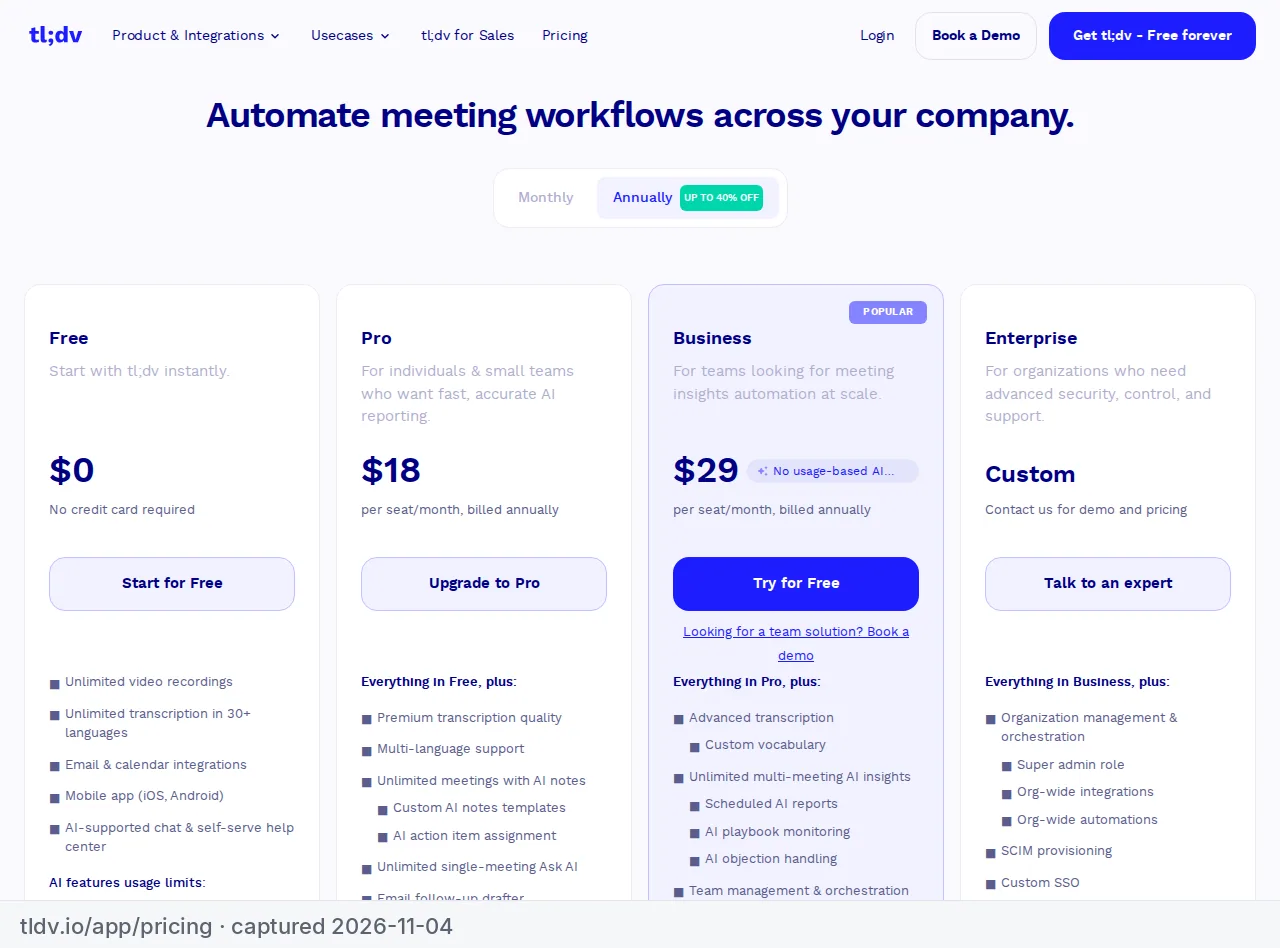
| Pricing | Free plan (unlimited recordings); Premium $16/mo annual or $20 monthly; Team $15/user/mo annual (2-user min) | Free plan; Pro €18/user/mo annual or €29 monthly; Business €29/user/mo annual or €39 monthly |
| Free plan | Yes, unlimited recordings | Yes |
| Paid from | $16/mo (annual) | €18/user/mo (annual) |
| Link | Try Fathom | Try tl;dv |
This comparison is based on each vendor's official pricing page and help center, checked in November 2026. We didn't run our own tests. For the rest of the field, see our roundup of the best AI meeting assistants for small teams.
Free plans: Fathom's is more generous
Both tools market themselves on free recording, but the details differ a lot.
Fathom Free includes:
- unlimited recordings and transcriptions;
- instant AI call summaries;
- clips, playlists and search across your calls;
- a choice of bot capture or bot-free capture (bot-free is in beta on Mac).
Fathom's pricing page marks some AI features as "limited use" on Free, including AI action items and Ask Fathom (its chat-with-your-calls feature), but doesn't give a number. Its help center also says the free version includes unlimited storage.
tl;dv Free includes unlimited recordings and transcripts, with these limits from tl;dv's help center:
- AI notes: your first 10 meetings get full AI notes. After that, AI notes cover only the first 10 minutes of each meeting.
- AI prompts and reports: 10 free AI prompts and 10 AI Reports.
- Retention: recordings are kept for 3 months, then deleted.
- Uploads: 5 manual file uploads.
- Zapier: 20 integration credits.
These limits are for the life of the account. In tl;dv's words, "they do not renew monthly."
Is Fathom really free and unlimited? For recording, transcripts and summaries, yes, according to Fathom's own pages. What's limited is some of the AI on top (action items and Ask Fathom). tl;dv's free plan is better seen as a long trial of its AI features.
Paid plans and pricing
Fathom prices in US dollars. tl;dv lists its prices in euros, though when we loaded its pricing page from the US it showed the same numbers in dollars ($18 and $29 a seat on annual billing). We show tl;dv's euro prices rather than converting; check which currency your checkout uses.
| Per user, per month | Fathom | tl;dv |
|---|---|---|
| Free | $0 | €0 |
| Individual / entry plan, annual | Premium $16 | Pro €18 |
| Individual / entry plan, monthly | Premium $20 | Pro €29 |
| Team plan, annual | Team $15 (2-user min) | — |
| Team plan, monthly | Team $19 (2-user min) | — |
| Business, annual | $25 (2-user min) | €29 |
| Business, monthly | $34 (2-user min) | €39 |
List prices as of November 2026. tl;dv's pricing page advertises "40% off on every annual plan"; the annual figures above are the per-seat prices it shows.
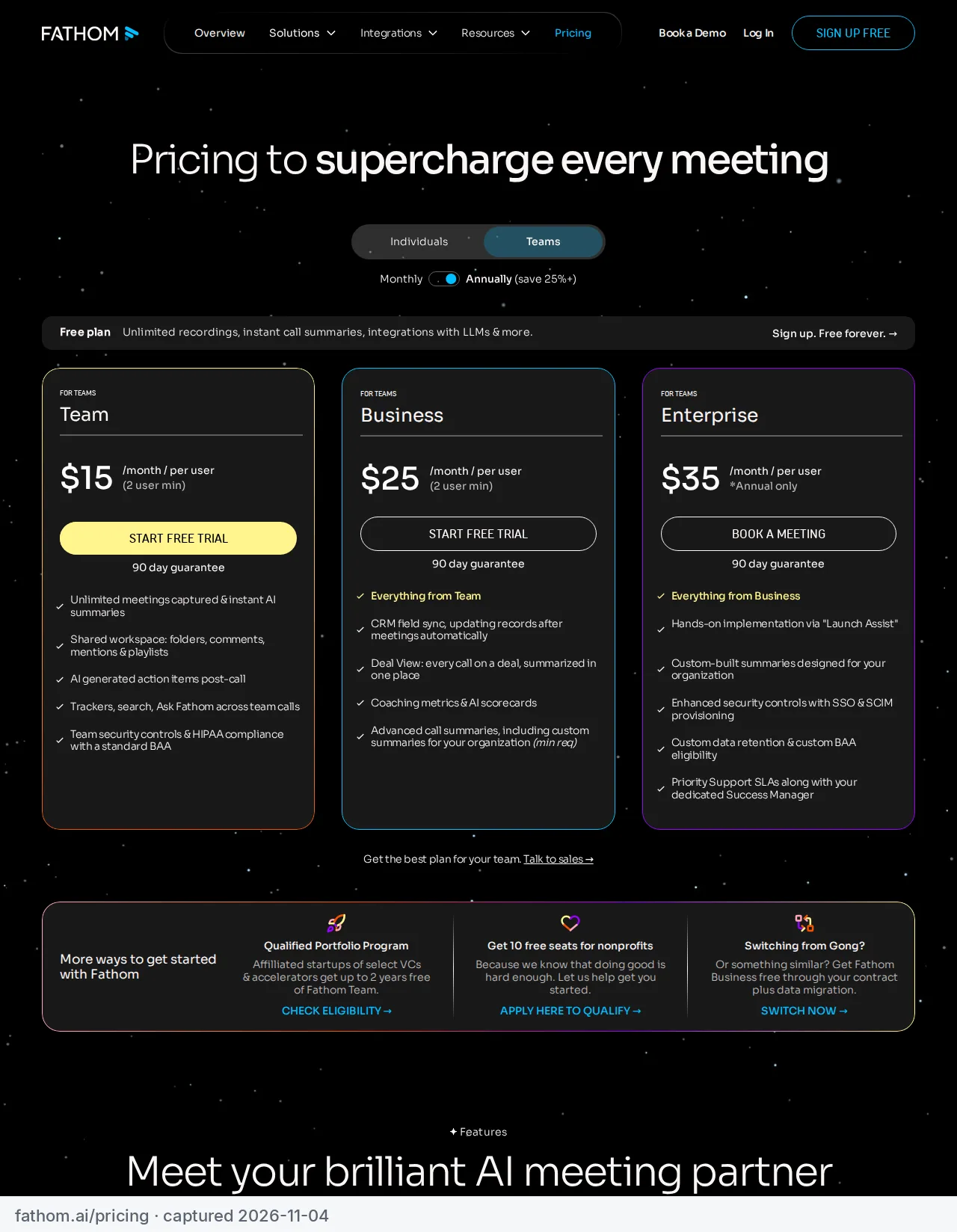
For a team of 3, Fathom Team costs $45 a month on annual billing ($57 monthly). tl;dv Pro costs €54 annually (€87 monthly).
Data location: tl;dv's clearest advantage
tl;dv is a European company. Its security page states that "all our data centers are located in Europe," that it is GDPR-compliant for all users, and that customers can choose whether its AI runs in Europe or the US.
Fathom doesn't make an equivalent EU-hosting claim on the pages we checked. Its help center links to a trust center for security details.
If you work with EU clients who ask where recordings are stored, tl;dv gives you a direct, documented answer. That alone can decide it.
Bot or no bot
Both tools let you choose.
- Fathom: bot capture, or bot-free capture in beta on Mac. Fathom's help center says bot-free capture also supports Slack Huddles.
- tl;dv: a bot by default, or its desktop app records without a bot. tl;dv says bot-free recording "captures only the spoken conversation — no video, no bot in the room."
Neither tool's bot-free mode is quite the full experience yet: Fathom's is in beta and Mac-only per its pricing page, and tl;dv's is audio-only.
Platforms, uploads and languages
| Fathom | tl;dv | |
|---|---|---|
| Meeting platforms | Zoom, Google Meet, Microsoft Teams | Zoom, Google Meet, Microsoft Teams, plus other platforms via the desktop app |
| Upload existing recordings | Not supported | 5 uploads on Free |
| Transcription languages | 38 | 30+ |
| Max recording length | Not stated on the pages we checked | 3 hours |
Language counts come from each vendor's own help center or features page.
The upload gap matters if you also record interviews or calls outside these platforms. Fathom's help center says it records live calls only and doesn't support uploaded recordings.
Integrations and multi-meeting AI
Fathom lists integrations with Slack, Zapier and Make, HubSpot, Salesforce and Asana, plus a public API and connections to Claude and ChatGPT. Some of these are marked "limited use" on lower plans, and CRM sync is capped at 3 users per domain on the plans where it appears.
tl;dv offers AI Reports that are scheduled and emailed to you, and AI prompts that work across one or many meetings. That's useful for spotting patterns across a series of sales or client calls. On Free, you get 10 of each, plus 20 Zapier credits.
Verdict: Fathom for most solo users, tl;dv for EU clients
Fathom
AI meeting recorder with a generous free plan
| If you're a… | Choose | Why |
|---|---|---|
| Solo consultant who wants free recording that lasts | Fathom Free | Unlimited recordings, transcripts and summaries |
| Solo consultant with EU clients | tl;dv | EU data centers, documented on its security page |
| Small sales team reviewing patterns across calls | tl;dv Pro or Business | Multi-meeting AI reports and prompts |
| Small team on a budget, US-based | Fathom Team | $15 per user annually, 2-user minimum |
| Someone who needs to transcribe uploaded files | tl;dv | Fathom doesn't support uploads |
Fathom is worth it for anyone who wants to stop paying for call recording. Skip it if you need EU data residency or uploads. In that case, try tl;dv.
To compare free limits against Otter, Granola, Tactiq and Fireflies as well, see our best free AI note-takers.
Frequently asked questions
Is Fathom really free?
Yes for recording: Fathom's free plan includes unlimited recordings, transcripts and AI call summaries. Some AI features, such as AI action items and Ask Fathom, are marked "limited use" on Free.
What does tl;dv's free plan include?
Unlimited recordings and transcripts, full AI notes for your first 10 meetings (then only the first 10 minutes of each), 10 AI prompts, 10 AI Reports and 3 months of recording retention. The limits are lifetime, not monthly.
Which one records without a bot?
Both can. Fathom offers bot-free capture in beta on Mac, and tl;dv's desktop app records audio without a bot.
Where does tl;dv store data?
tl;dv's security page says all its data centers are in Europe and that customers can choose EU or US hosting for its AI.