Zapier vs Make for Small Businesses (2026)
Make costs far less for multi-step workflows; Zapier is simpler and connects more apps. We priced three real workloads to show where each one wins.
Pick Make if cost matters and your workflows have more than two steps. On the three small-business workloads we priced, Make's Core plan came out roughly 4 to 8 times cheaper than Zapier Professional on monthly billing. Pick Zapier if you want the simplest setup and the widest app coverage. Zapier says it connects 9,000+ apps; Make's pricing page says 3,000+. Zapier also never charges tasks for triggers, so a low-volume, two-step automation can stay on its free plan.
| Feature | Make | Zapier |
|---|---|---|
| Best for | Small businesses building complex automations on a budget | Non-technical users who want the widest app coverage |
| Pricing | Free (1,000 credits/mo). 10,000 credits/mo: Core $12, Pro $21, Teams $38/mo billed yearly; $16 / $28 / $51 billed monthly. 20,000 credits/mo (monthly): $28 / $51 / $94. Enterprise custom. | Free plan (100 tasks/mo); Professional $19.99/mo annual or $29.99 monthly (750 tasks); Team $69/mo annual or $103.50 monthly |
| Free plan | Yes, 1,000 credits/mo | Yes, 100 tasks/mo |
| Paid from | $12/mo billed yearly, $16 monthly (Core, 10,000 credits/mo) | $19.99/mo (annual) |
| Link | Try Make | Try Zapier |
Pricing: what a task and a credit cost
The two tools meter usage differently, and that difference decides most of the cost.
Zapier counts tasks. According to Zapier's help center, "a task is any successful action that runs in Zapier." Trigger steps never use tasks, and neither do polls for new data, test runs or failed steps. A Zap with one trigger and two actions uses 2 tasks each time it runs.
Make counts credits. Make's help center says each module in a scenario uses 1 credit per operation for non-AI apps, and the trigger counts too: it "runs once to check for new data," which is 1 operation. So the same three-step workflow uses 3 credits a run. AI modules can use more, based on tokens. If the trigger returns several items at once, every later module runs once per item.
Zapier plans:
| Plan | Tasks a month | Billed monthly | Billed yearly (per month) |
|---|---|---|---|
| Free | 100 | $0 | $0 |
| Professional | 750 | $29.99 | $19.99 |
| Professional | 2,000 | $73.50 | $49 |
| Professional | 10,000 | $193.50 | $129 |
| Team | 2,000 | $103.50 | $69 |
Professional has more task tiers in between (1,500 and 5,000 are used below). Team adds up to 25 users, shared Zaps and folders, shared app connections and SAML SSO. If you run out of tasks, Zapier's pricing page says you're switched to pay-as-you-go unless you turn it off.
Make plans:
| Plan | Credits a month | Billed monthly | Billed yearly (per month) |
|---|---|---|---|
| Free | 1,000 | $0 | $0 |
| Core | 10,000 | $16 | $12 |
| Pro | 10,000 | $28 | $21 |
| Teams | 10,000 | $51 | $38 |
| Core | 20,000 | $28 | not checked |
On yearly Core, Make releases credits 10,000 a month. On yearly Pro and Teams, the year's credits are available all year. Enterprise pricing is custom. See Make's pricing for the current figures.
Which is cheaper for a small business?
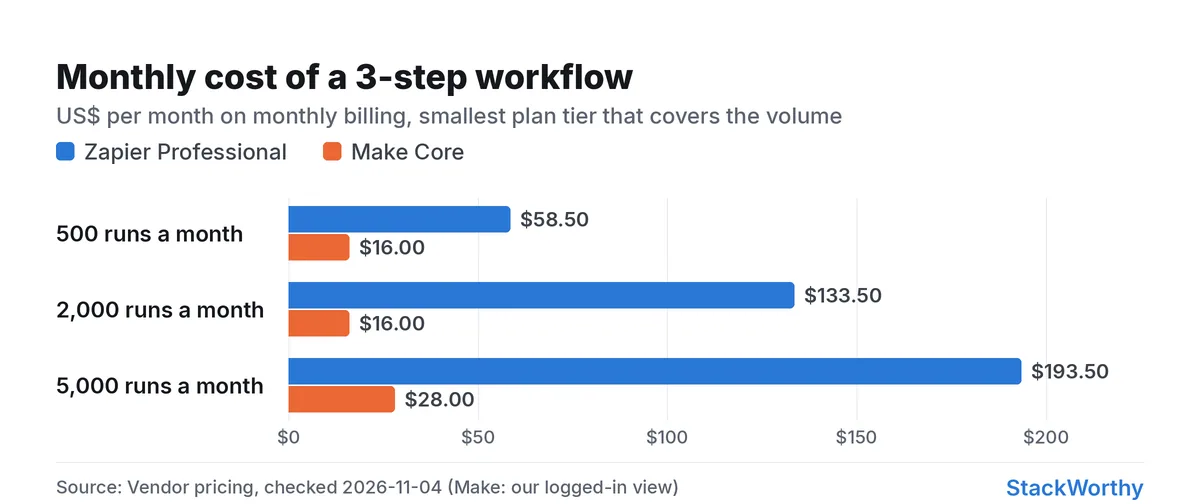
Make, at every volume we priced. Here's a three-step workflow (a trigger plus two actions, such as "new form entry → add a CRM contact → post to Slack"), one item per run, on the smallest plan tier that covers it:
| Runs a month | Zapier tasks | Zapier Professional | Make credits | Make Core |
|---|---|---|---|---|
| 500 | 1,000 | $58.50 monthly, $39 yearly (1,500-task tier) | 1,500 | $16 monthly, $12 yearly |
| 2,000 | 4,000 | $133.50 monthly, $89 yearly (5,000-task tier) | 6,000 | $16 monthly, $12 yearly |
| 5,000 | 10,000 | $193.50 monthly, $129 yearly (10,000-task tier) | 15,000 | $28 monthly (20,000-credit tier) |
Three things can change this math:
- Scheduled triggers use Make credits. Because Make charges 1 credit each time a trigger checks for data, a scenario that checks every 15 minutes uses about 2,900 credits a month on checks alone. That still fits inside each Make tier above, but it's nearly three times the free plan's 1,000 credits. Schedule checks less often if you're on Free. Zapier's polls are free.
- AI steps cost more on both. Make's AI modules use credits based on tokens. Zapier says AI model tier, code runtime and connector type all affect how many tasks a step uses.
- Workflows that loop over items. If one run handles 20 rows, Make runs every later module 20 times. Zapier counts each successful action too, so both grow, but Make also charges the trigger.
Even with these caveats, the gap is wide enough that most small businesses running multi-step automations will pay less on Make.
Free plans: Zapier caps steps, Make caps credits
Zapier Free gives you 100 tasks a month and two-step Zaps only: one trigger and one action. That's enough for simple hand-offs, like one task in your project tool per meeting (we walk through that in our guide to turning meeting notes into tasks). Anything with a third step, an AI clean-up or a Slack alert needs Professional.
Make Free gives you 1,000 credits a month. A three-module scenario at 3 credits a run gets you roughly 330 runs, fewer if the trigger runs on a schedule. Make's pricing page lists other free-plan limits, such as how many scenarios can be active at once; we couldn't read those rows this month, so check them before you build.
Verdict: Make Free is the better place to try a real multi-step workflow. Zapier Free is the better choice for one or two simple two-step automations that run rarely, because its triggers cost nothing.
Workspace views
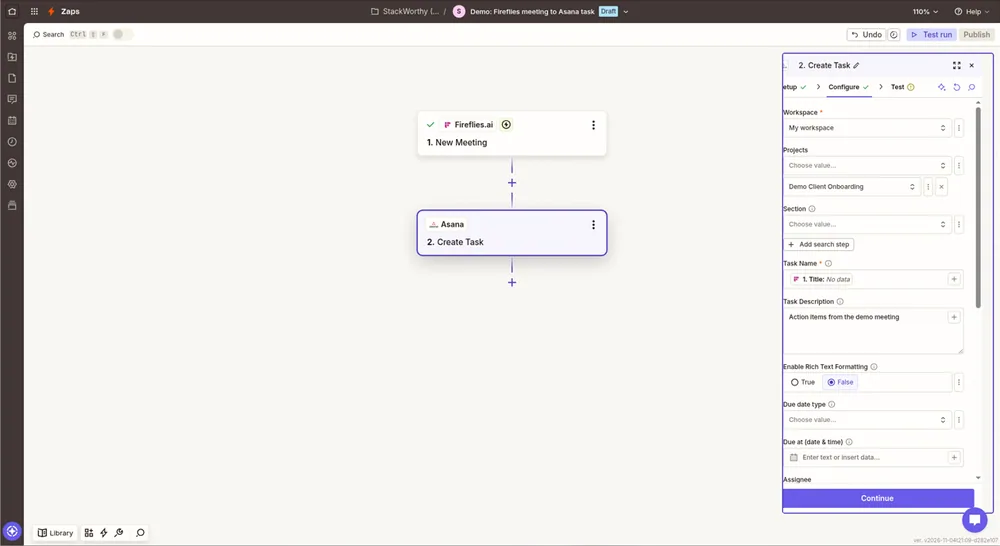
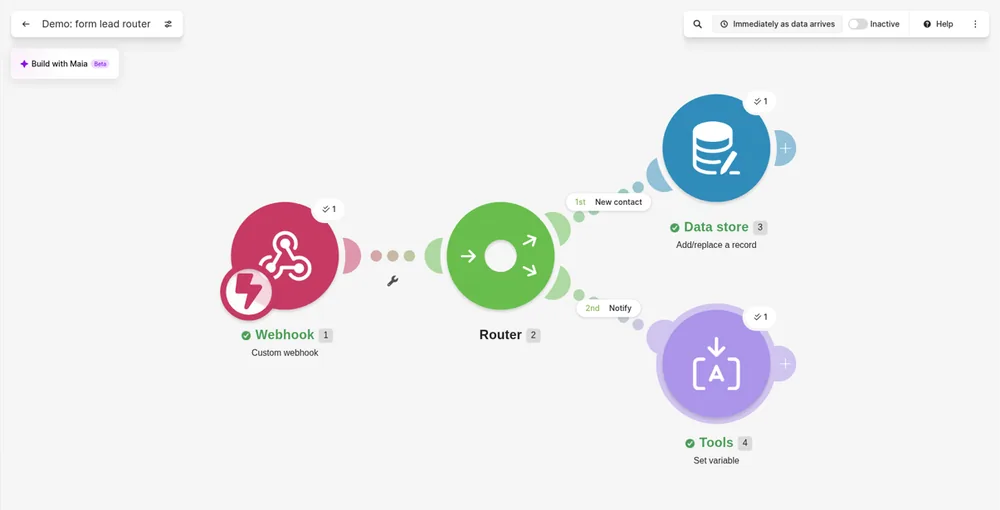
Is Make harder to learn?
Probably a little, by both vendors' own accounts. We haven't measured it ourselves.
- Zapier builds each Zap as a list of steps, top to bottom, and offers Zapier Copilot, an AI assistant that drafts Zaps for you. Zapier's comparison page says Make's visual builder comes with a learning curve.
- Make builds scenarios on a visual canvas, with modules connected by lines and routers that split a flow into branches. Make's own comparison article concedes that "Zapier is often the tool of choice if you're new to automation," and points to Make Academy, which it says has 38 interactive courses.
If you've never built an automation, Zapier is the gentler start. If your workflows branch ("if the deal is over $5,000, notify the owner; otherwise add it to a list"), Make's canvas makes those branches easier to see.
Does Make connect to the apps I use?
Probably, but check first. Zapier lists 9,000+ apps on its app directory. Make's pricing page says it connects 3,000+ native apps. Popular small-business tools are on both. Niche or industry-specific apps are more likely to be on Zapier only.
Make argues for depth over breadth: its comparison article says Make "generally provides more pre-existing actions per app than Zapier," with Xero as its example (84 actions on Make vs 25 on Zapier, by Make's count). Before you choose, search both directories for your three or four most important apps and check that the specific trigger and action you need exist.
For apps without a ready-made integration, both have a fallback. Make's app documentation lists built-in HTTP and Webhooks apps, and Zapier lists webhooks as a Professional feature on its pricing page.
Teams and collaboration
Zapier's Team plan ($69 a month on yearly billing, $103.50 monthly, for 2,000 tasks) adds up to 25 users, shared Zaps and folders, shared app connections, SAML SSO and priority support. Make's Teams plan costs $38 a month on yearly billing or $51 monthly for 10,000 credits. If several people build and maintain automations, compare these two plans' collaboration features on each vendor's pricing page before you buy. Make's feature rows weren't readable to us this month.
When neither fits: n8n
If you're running tens of thousands of runs a month, or want to keep workflows on your own server, look at n8n. Its pricing page says you "only pay when a workflow runs from start to finish," not per step, and it offers a self-hosted Community Edition on GitHub. Self-hosting means you maintain the server yourself, so it suits teams with some technical help.
Verdict: Make for most small businesses, Zapier for simplicity and breadth
Make
Visual automation builder for multi-step workflows
| If you… | Choose | Why |
|---|---|---|
| run multi-step workflows and watch costs | Make Core | $16 a month (or $12 yearly) covered every workload up to 2,000 runs in our pricing |
| need one or two simple automations that run rarely | Zapier Free | Two-step Zaps, and triggers never use tasks |
| are new to automation and want the gentlest start | Zapier | Step-by-step editor and Copilot |
| rely on a niche app | Zapier | 9,000+ apps vs Make's 3,000+, by each vendor's count |
| build branching workflows | Make | Visual canvas with routers |
| run very high volume or want self-hosting | n8n | Priced per workflow run, with a self-hosted edition |
Make is worth it for small businesses whose automations have three or more steps. Skip it if an app you depend on isn't in Make's directory, or you want the simplest possible setup. In that case, start with Zapier. If your automations start from meetings, our roundup of AI meeting assistants covers which note-takers connect to these tools. Shopping away from Zapier? See best Zapier alternatives, n8n vs Zapier, n8n vs Make, and 10 AI automations for solopreneurs.
Get the StackWorthy briefing
One short email when tools worth your money change. No spam.
Frequently asked questions
Which is cheaper for a small business, Zapier or Make?
Make, for most multi-step workflows. A three-step workflow running 2,000 times a month fits Make Core at $16 a month on monthly billing ($12 yearly), while Zapier needs its 5,000-task Professional tier at $133.50 a month ($89 yearly). Prices checked November 4, 2026.
What counts as a task in Zapier and a credit in Make?
A Zapier task is a successful action step; triggers, polls, tests and failed steps don't count. In Make, each module run is an operation, usually 1 credit, and the trigger counts too each time it checks for new data. AI steps can use more on both.
Is Make harder to learn than Zapier?
A little, by both vendors' accounts. Zapier's step-by-step editor and Copilot assistant make it the gentler start, and Make's own comparison says Zapier is often the choice for people new to automation. Make's visual canvas is easier to follow for branching workflows.
Does Make connect to the apps I use?
Usually. Make's pricing page says it connects 3,000+ native apps, against the 9,000+ Zapier lists. Search both directories for your key apps, and check that the exact trigger and action you need exist. Both offer a webhook fallback for apps without an integration.