Notion vs ClickUp for Small Teams (2026)
Choose Notion when docs and wiki structure lead; choose ClickUp when tasks, views and time tracking lead. Compare free limits and 5-seat yearly cost before you standardize.
Pick Notion if your team lives in docs, wikis and databases first. Pick ClickUp if tasks, views, time tracking and automations are the center of the day. For a typical 2–10 person team, the decision is docs-first vs tasks-first — not which brand has more feature bullets.
This is a researched comparison, not a hands-on test.
Quick comparison
| Notion | ClickUp | |
|---|---|---|
| Best for | Docs, wikis, flexible databases | Tasks, views, PM + lightweight docs |
| Free plan | $0; limits bite for 2+ members | Free Forever; unlimited members, 60 MB storage |
| Paid from (yearly) | Plus $10/member/mo | Core $9/user/mo |
| AI "full" tier | Business $20/member/mo (Agent + AI Meeting Notes) | Business $17/user/mo (Brain² + higher credits) |
| 5 seats, mid paid (yearly $/mo) | Plus $50 · Business $100 | Core $45 · Business $85 |
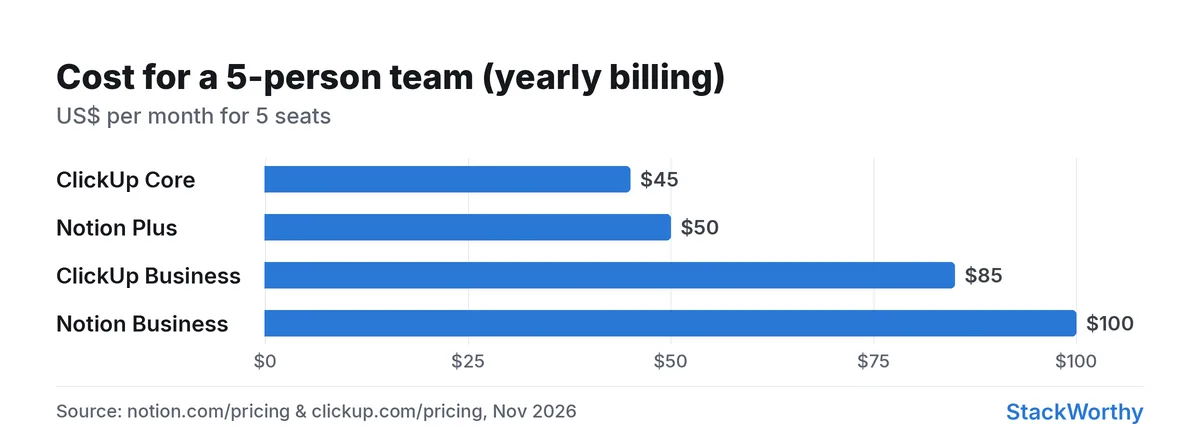
Yearly-billing seat math from vendor pricing pages, Nov 2026.
Pricing for a small team
Prices checked November 2026; billing terms shown below.
Notion
With Pay yearly selected (page shows "Save up to 20% with yearly"):
| Plan | Price shown | Notable limits / AI |
|---|---|---|
| Free | $0 / member / mo | Limited blocks for 2+ members; file uploads up to 5 MB; Notion AI = limited trial |
| Plus | $10 / member / mo | Uploads up to 5 GB; AI still limited trial |
| Business | $20 / member / mo | Notion Agent, AI Meeting Notes, Enterprise Search (beta), SSO |
| Enterprise | Custom | Advanced security / SCIM / etc. |
Custom Agents are free to try, then $10 per 1,000 monthly Notion credits (same pricing page).
ClickUp
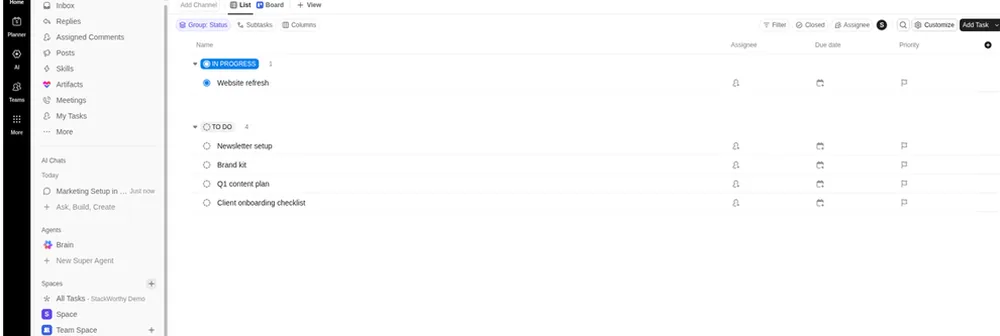
ClickUp Free Forever workspace (representative; no time-tracking or AI test).
Yearly billing (page: "Save up to 33% with yearly"):
| Plan | Yearly $/user/mo | Monthly $/user/mo | Storage / AI credits (as listed) |
|---|---|---|---|
| Free Forever | $0 | $0 | 60 MB storage; unlimited free members; Brain trial 500 credits / workspace |
| Core | $9 | $12 | Unlimited storage; 1K credits / user / mo pooled (trial premium models) |
| Business | $17 | $25 | 1.5K credits / user / mo pooled; more automations & dashboards |
| Enterprise | Custom | Custom | Scaled Brain; governance |
| MAX | $100 | $120 | Max AI engine + enterprise controls |
Five people, yearly billing (illustrative)
| Stack | Math | $/mo |
|---|---|---|
| Notion Plus × 5 | 5 × $10 | $50 |
| Notion Business × 5 | 5 × $20 | $100 |
| ClickUp Core × 5 | 5 × $9 | $45 |
| ClickUp Business × 5 | 5 × $17 | $85 |
ClickUp Core undercuts Notion Plus slightly before AI; once you need Notion's Agent / AI Meeting Notes you are on Business at $100/mo for five seats, versus ClickUp Business at $85/mo for five — with different AI packaging. Always confirm seat rules and taxes on the checkout page.
Free plans: what actually happens with 2–5 people
Notion Free is fine for a solo workspace. With two or more members, the pricing page flags limited blocks and keeps uploads at 5 MB. Teams outgrow Free quickly if they share a real wiki.
ClickUp Free Forever includes unlimited members, docs and boards with 60 MB storage. Its pricing matrix marks basic time tracking as a trial on Free and included on Core; the time-tracking help page lists 100 uses for creating, editing or deleting Free time entries. These are usage limits, not a timed trial. Ongoing basic time tracking—not only storage—can require an upgrade. Advanced and billable time features have separate limits.
Verdict on free: ClickUp is a useful free team workspace, but its 60 MB storage cap and 100 basic time-tracking uses (creating, editing or deleting entries) are separate upgrade boundaries. The tracking allowance is usage-based, not a timed trial; Core includes ongoing basic tracking, while advanced and billable time features have separate limits. Notion Free is better suited to a personal notes/wiki workspace, with limits for two or more members.
Docs-first vs tasks-first
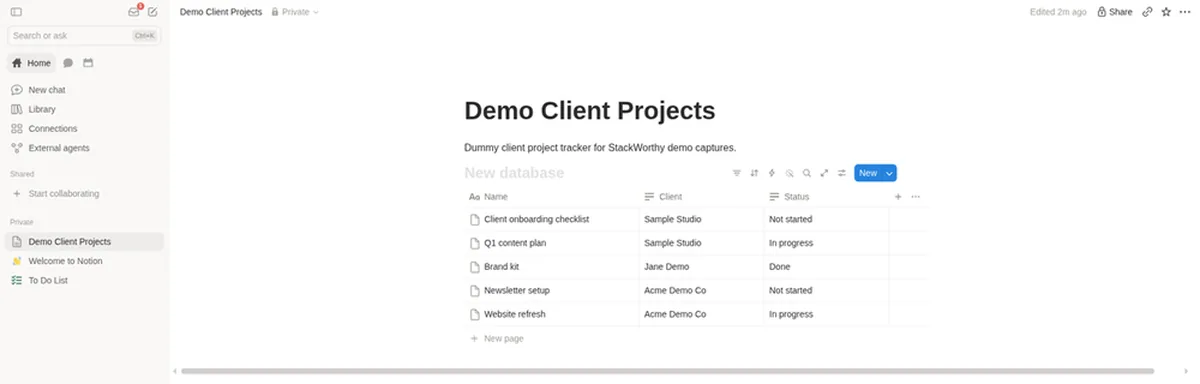
Notion workspace example; exact plan not shown.
Notion is still strongest as a connected document and database layer: wikis, specs, meeting notes pages, lightweight project trackers built from databases, and public/simple sites. Project management is possible, but task ops (workload, native time tracking depth, many PM views) are not why most small teams pick it.
ClickUp is tasks and views first: lists, boards, calendar, Gantt (unlimited on Core+), goals, time tracking, and automations with higher monthly caps on paid tiers. Docs and wikis exist (Collaborative Docs on Free; private docs on Business), so ClickUp can replace a light wiki — but long-form knowledge bases and highly custom databases are where Notion usually feels more natural.
Using both only makes sense when the overlap is deliberate (for example Notion as the company wiki, ClickUp as delivery PM). Two systems without a clear split creates duplicate tasks and stale docs.
AI: what you actually pay for
Notion AI packaging (Nov 2026): Free and Plus include a limited trial of Notion AI. Notion Agent and AI Meeting Notes are listed on Business. Custom Agents burn Notion credits after the try ($10 / 1,000 credits). Upgrading Plus → Business "just for AI" is a real $10/member/mo jump (e.g. +$50/mo at five seats).
ClickUp Brain²: every plan lists a credit allowance (Free workspace trial 500; Core 1K/user/mo pooled; Business 1.5K/user/mo pooled). Business adds premium-model positioning and higher automation limits. Extra AI credits are sold as top-ups ($10 per 10K on the pricing page). You are buying a PM suite that includes AI credits, not a separate "AI plan" the way Notion gates Agent to Business.
If AI meeting notes inside your doc tool are the buying reason, Notion Business is the clear Notion path. If AI assists inside tasks/docs/automations on a PM board, ClickUp's included Brain credits may be enough before MAX.
Project management and client work
For freelancer / small-studio PM (deadlines, assignees, time, client sharing):
- ClickUp fits better out of the box: tasks, time tracking, guest permissions on Core+, and views clients can follow.
- Notion fits when the "project" is mostly a living brief, content calendar or research database and tasks are secondary.
Guest/client access and seat minimums for other tools (for example monday.com's paid-plan seat floor) are outside this Notion vs ClickUp comparison.
Integrations into automation stacks (Zapier/Make) work with both — see Zapier vs Make when the bottleneck is glue code, not the PM tool.
Verdict
| If you… | Choose |
|---|---|
| Need a company wiki / flexible docs+databases | Notion (Plus for collaboration; Business if Agent / AI Meeting Notes matter) |
| Need task PM, time tracking and many views | ClickUp (Core for ongoing basic time tracking; Free has storage and tracking-use limits) |
| Are five people watching cost before AI | ClickUp Core (~$45/mo) vs Notion Plus (~$50/mo) on yearly rates above |
| Want Notion-style Agent features | Budget Notion Business |
| Want one tool and hate context-switching | Pick the center of gravity (docs → Notion, tasks → ClickUp); avoid dual-running without a rule |
For solo project-work choices, see best project management tools for freelancers.
Related: Monday.com vs ClickUp for small teams.
Get the StackWorthy briefing
One short email when tools worth your money change. No spam.
Frequently asked questions
Is Notion or ClickUp better for project management?
ClickUp fits task-centric PM better (views, time tracking, automations). Notion is stronger when the project is mostly docs and databases.
Which is cheaper for 5 people?
On yearly rates checked Nov 5, 2026: ClickUp Core is about $45/mo (5×$9) vs Notion Plus about $50/mo (5×$10). Notion Business (needed for Agent / AI Meeting Notes) is about $100/mo vs ClickUp Business about $85/mo.
Do I need Business for Notion AI?
Full Notion Agent and AI Meeting Notes are listed on Business. Free and Plus only include a limited Notion AI trial. Custom Agents use Notion credits after a free try.
Can ClickUp replace a wiki?
For a light wiki, yes — Docs ship on Free Forever. For a highly structured company knowledge base, Notion's databases and page model usually fit better.