Is ClickUp Worth It for a 5-Person Team?
ClickUp Core at $45/mo yearly suits most 5-person teams once Free Forever's 100-use time-tracking cap or 60 MB storage runs out.
ClickUp is worth it for many 5-person teams on Core — $45/mo yearly for five seats — when you will actually use tasks, views, docs and time tracking together. Free Forever is fine to start, but two limits decide when it stops being enough: 60 MB of storage and 100 uses of basic time tracking. Skip ClickUp if the team only needs a lightweight board or already standardized on a Notion wiki.
This is a researched guide, not a hands-on test of Brain, automations or time tracking.
Set up ClickUp for a 5-person team
These steps follow ClickUp's help center on its hierarchy; only the final screen below is from our team's Free Forever workspace.
- One Workspace for the whole team. ClickUp recommends one Workspace per organization, so all five people work in the same place.
- Invite the other four. Free Forever allows unlimited free members. On a paid plan, ClickUp's pricing FAQ says an upgrade covers the entire Workspace, so every member becomes a paid seat.
- Create a Space for client work. Spaces group work by team, client or type of work, and each Space can be shared with everyone or made private.
- Add a List per project. Lists "contain tasks that are part of the same project or goal." Folders are an optional layer if you run many projects per client.
- Add tasks and group them by status. Each task can hold subtasks for smaller action items.
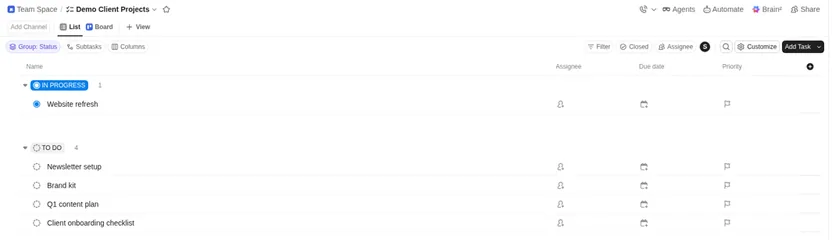
The end state: our team's Demo Client Projects list in a Team Space on Free Forever, with dummy tasks (representative; no AI or time-tracking test).
Is Free Forever enough for five people?
Often for the first weeks: unlimited members, collaborative docs, Kanban boards and a calendar view are listed on Free. What usually ends the free run is one of these:
- Time tracking: the Free card lists time tracking, but ClickUp's help center caps basic create/edit/delete time entries at 100 uses on Free Forever; Core and up are unlimited. Time entries from integrations or ClickUp's AI count toward the same limit. Five people each logging one entry a working day would use all 100 in four weeks.
- Storage: 60 MB total fills quickly if you attach decks, images or recordings.
- Structure and access: Free lists custom fields and Gantt charts as trials and 100 automation actions a month per workspace; Core includes custom fields and Gantt and raises automations to 1,000 a month. Guests are free on Free Forever but get full edit rights that can't be changed; limited-access and view-only guests start on paid plans.
Advanced time tracking (timesheets, tags, billable entries, time not tied to a task) is separate: ClickUp lists it as a trial on Core, 100 uses on Business and unlimited only on higher tiers. Don't plan client billing on Core's basic tracking alone.
What 5 seats cost
Prices checked November 2026; USD.
| Plan | Per user / mo (yearly) | 5 seats / mo | Notes |
|---|---|---|---|
| Free Forever | $0 | $0 | Unlimited members and guests; 60 MB storage; 100 automation actions/mo; 100 basic time-tracking uses; Brain² trial 500 credits/workspace |
| Core | $9 ($12 monthly) | $45 | Unlimited storage; unlimited basic time tracking; 1,000 automations/mo; Brain trial 1,000 credits/user/mo pooled |
| Business | $17 ($25 monthly) | $85 | 10,000 automations/mo; Brain 1,500 credits/user/mo pooled; timesheets |
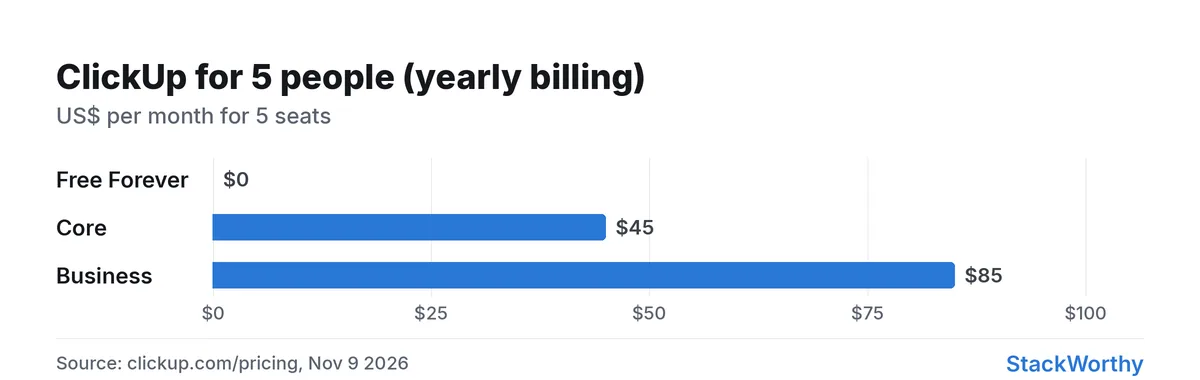
Yearly-billing totals from clickup.com/pricing, Nov 9 2026.
Core or Business for a studio of five?
- Core fits most 5-person studios: unlimited storage and basic time tracking, custom fields, 1,000 automations/mo, and guest permission controls (limited-access and view-only guests).
- Business when you need higher automation caps (10,000/mo), advanced dashboards, private docs/views, timesheets or the higher Brain credit pool.
AI credits are pooled per plan. Five people on Core share the trial allowance listed per user; heavy Brain use can burn the pool even when seat cost looks fine. ClickUp sells extra credits at $10 per 10,000. Confirm current credit rows on the pricing page before promising AI-heavy workflows.
How it compares at 5 seats
| Option | 5 seats / mo (yearly) | Fit |
|---|---|---|
| ClickUp Core | $45 | Tasks-first team wanting one hub |
| ClickUp Business | $85 | Higher automations / AI credits |
| Notion Plus | $50 | Docs/databases first (Notion vs ClickUp) |
| Notion Business | $100 | Notion Agent / AI Meeting Notes needed (Notion AI review) |
| monday.com Basic | $45 | Board-first; paid plans start at 3 users (monday.com vs ClickUp) |
Verdict
Worth it on Core when five people will live in ClickUp for tasks, light docs and time tracking. Stay on Free only while you're under the 100-use time-tracking cap and the 60 MB storage limit; if you log hours every day, budget for Core from the start. Choose Business for automation/AI headroom or timesheets. Choose Notion or monday instead when docs-first or board-first workflows matter more than ClickUp's depth — see Notion vs ClickUp and best project management tools for freelancers.
ClickUp
Tasks, docs, chat and AI in one work platform
Get the StackWorthy briefing
One short email when tools worth your money change. No spam.
Frequently asked questions
How much is ClickUp for 5 users?
On yearly billing checked November 9, 2026: Free Forever is $0; Core is $9/user/mo → $45/mo for 5; Business is $17/user/mo → $85/mo for 5. Monthly list prices are higher ($12 / $25 per user).
Is Free Forever enough for a 5-person team?
It can be at first because members are unlimited, but two limits usually end the free run: ClickUp's help center caps basic time-entry create/edit/delete at 100 uses on Free Forever, and storage is 60 MB in total. Five people logging one time entry a working day would use the 100 in about four weeks; teams that attach lots of files hit storage first. Free also caps automations at 100 actions per workspace a month (Core: 1,000) and offers custom fields only as a trial. Guests are free on Free Forever, but with full edit rights; limited-access guests need a paid plan.
Core or Business for a studio of 5?
Core is the default for most 5-person studios. Pick Business for 10,000 automations/mo, private docs/views, advanced dashboards or the higher Brain credit pool.
How do I set up ClickUp for a small team?
Following ClickUp's help center: use one Workspace for the organization, invite your teammates, create a Space for a team or client, add a List per project, then add tasks and group them by status. Folders are optional. On a paid plan every Workspace member is billed.
ClickUp vs Notion at 5 seats?
ClickUp Core is $45/mo yearly for 5; Notion Plus is $50/mo and Business $100/mo. Choose ClickUp for tasks-first work; Notion when docs and databases lead.