Monday.com vs ClickUp for Small Teams (2026)
Pick ClickUp for unlimited free seats and deep task views; pick monday.com when you already have three paid seats and want a simpler board. Prices checked November 2026.
Pick ClickUp if you want unlimited free seats, deep task views and no 3-seat paid minimum. Pick monday.com if you want the quickest path to a shared visual board and already have at least three people who need paid seats. For a two-person shop, both free plans fit: monday Free covers up to 2 seats and 3 boards, and ClickUp Free Forever allows unlimited members with 60 MB of storage and 100 basic time-tracking uses. For five people, yearly Core and Basic land at the same per-seat sticker, so the real difference is how each tool makes you set up the work.
This is a researched comparison, not a hands-on test.
Quick comparison
| ClickUp | monday.com (work management) | |
|---|---|---|
| Best for | Tasks, views, docs, automations | Visual boards, simple onboarding |
| Structure | Workspace → Space → (Folder) → List → tasks | Workspace → board → items, groups and columns |
| Free plan | Free Forever; unlimited members, 60 MB storage, 100 basic time-tracking uses | Free; up to 2 seats, up to 3 boards |
| Guests / clients | Free: unlimited guests at no charge (full edit rights, not adjustable); paid plans add limited-access and view-only guests | Unlimited free viewers from Basic; guest access from Standard |
| Automations | 100 actions/mo on Free; 1,000 on Core; 10,000 on Business | 250 actions/mo on Standard; 25,000 on Pro |
| Paid seat minimum | No 3-seat minimum; an upgrade covers every Workspace member | Paid plans start from 3 users |
Costs for 3 and 5 seats are in one section below.
First-hour setup
monday.com starts from a board. Its help center describes work as organized in workspaces, with boards as "the core building block", made up of items, groups and columns; templates give you a starting structure instead of a blank board. For a client project, that means one board where each row is a deliverable and columns hold status, owner and dates.
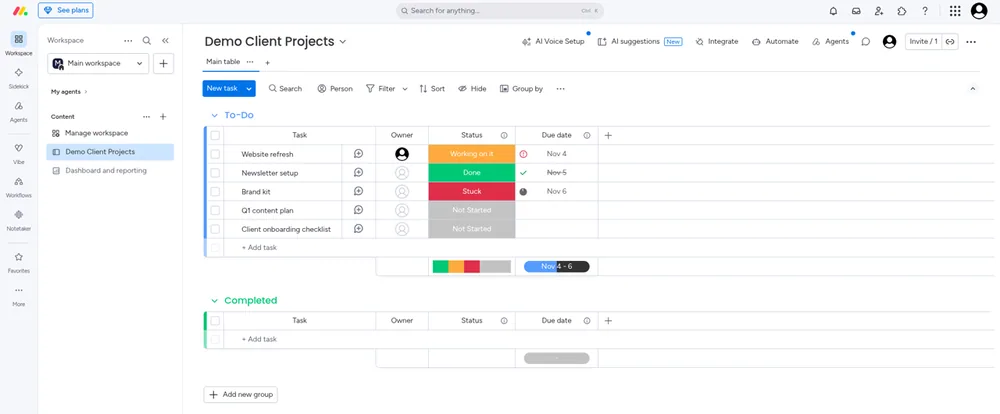
monday.com workspace example; exact plan not shown. Sample statuses/dates are not observed project outcomes.
ClickUp asks you to choose a place in its hierarchy first. ClickUp's help center recommends one Workspace per organization, then Spaces for teams, clients or types of work, optional Folders, and Lists that "contain tasks that are part of the same project or goal." For the same client project, that can be a Space for client work and a List per project, with tasks grouped by status, as in the list below.
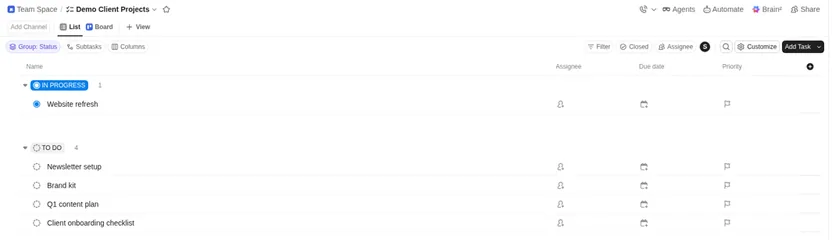
ClickUp Free Forever: the Demo Client Projects list in a Team Space, with dummy tasks (representative workspace; no AI or time-tracking test).
Day-to-day for a 5-person team
- Views: ClickUp Free lists Kanban boards and a calendar view, and Core adds unlimited Gantt charts. On monday, Timeline & Gantt and Calendar views start on Standard.
- Clients and guests: monday Basic includes unlimited free viewers, and guest access starts on Standard. ClickUp's pricing FAQ says Free Forever workspaces can add unlimited guests at no charge, but those guests get full create and edit permissions that can't be changed. Paid plans add limited-access and view-only guests (Core includes 5 guest seats for one paid user plus 2 per additional paid user), which is what the Core card's "Guest Permissions" refers to.
- Automations: monday's automations and integrations start on Standard at 250 actions/mo each (25,000 on Pro). ClickUp lists 100 automation actions per workspace a month on Free, 1,000 on Core and 10,000 on Business.
- Time tracking: ClickUp's Free card lists time tracking, but its help center caps basic create/edit/delete time entries at 100 uses on Free Forever (unlimited on Core and up). Advanced tracking (timesheets, tags, billable entries) is separate: a trial on Core and 100 uses on Business. monday lists time tracking on Pro.
Learning curve
monday.com usually feels faster to start: one board, colorful status labels, fewer nested objects. That suits teams that want a shared board without inventing a hierarchy.
ClickUp packs more into one product — lists, boards, calendar, docs, chat, goals, automations — so the first week takes longer. Once a small team settles on a Space/List pattern, the same login covers more of the workday.
These are researched impressions, not a timed usability study.
Free plans for freelancers
- Solo or two people: monday Free can work if you stay on ≤2 seats and ≤3 boards. ClickUp Free Forever also works and allows more members, but 60 MB storage fills quickly with attachments and basic time tracking stops at 100 uses.
- Three or more collaborators: monday moves you onto paid seats (3-user minimum). ClickUp has no 3-seat paid floor, so you can stay on Free until storage, the time-tracking cap or automation needs push an upgrade — and an upgrade bills every Workspace member.
AI packaging (official pages only)
- ClickUp: every plan lists Brain² with a credit allowance: Free 500 credits per workspace (trial), Core 1,000 credits/user/mo pooled (trial), Business 1,500 credits/user/mo pooled. Extra AI credits are sold as top-ups on the pricing page.
- monday.com: AI starts on paid work-management plans: Basic lists 3 AI tools and 1,000 AI credits/mo, Standard 5 tools and 2,000, Pro 6 tools and 3,000. Free lists AI features as available from Basic.
We did not run either AI assistant for this post.
Cost for 3 and 5 seats
Prices checked November 2026; USD, yearly billing unless noted.
| Feature | ClickUp | monday.com |
|---|---|---|
| Free plan | Yes, unlimited members, 60 MB storage | Yes, up to 2 seats (3 boards, 3 docs) |
| Paid from | $9/user/mo billed yearly (Core) | $9/seat/mo billed annually (Basic, 3-seat minimum) |
| Pricing | Free Forever $0 (60 MB storage); Core $9/user/mo (regular $12), Business $17 (regular $25), MAX $100 (regular $120), billed yearly; Enterprise custom | Free up to 2 seats; Basic $9, Standard $12, Pro $19 /seat/mo billed annually; Enterprise custom. Paid plans start from 3 users. |
| Link | Try ClickUp | Try monday.com |
| Seats, yearly $/mo | ClickUp | monday.com |
|---|---|---|
| 3 seats | Core $27 · Business $51 | Basic $27 · Standard $36 · Pro $57 |
| 5 seats | Core $45 · Business $85 | Basic $45 · Standard $60 · Pro $95 |
| AI on paid plans | Brain² credits: Core 1,000 · Business 1,500 per user/mo, pooled | Basic 3 tools · 1,000 credits/mo; Standard 5 · 2,000; Pro 6 · 3,000 |
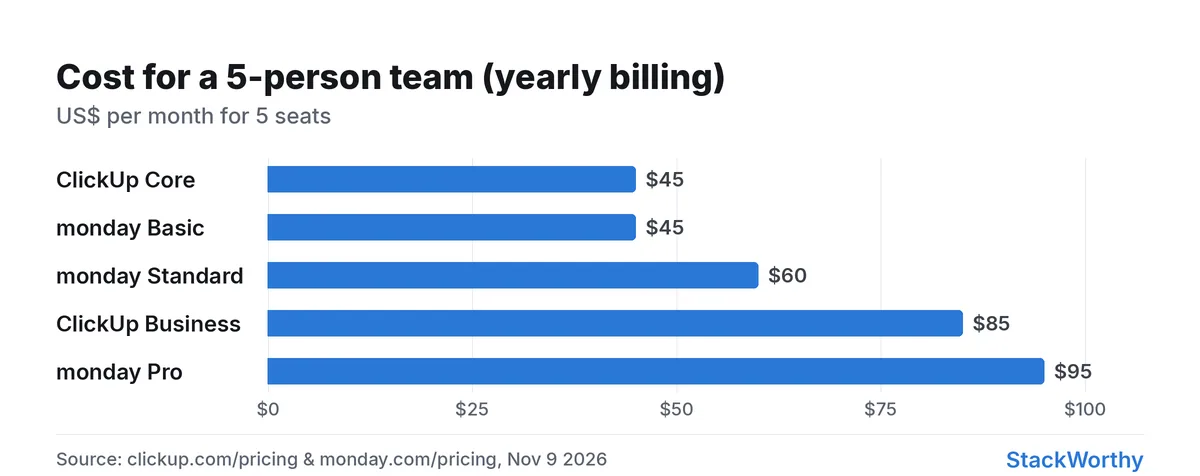
Yearly-billing seat math from vendor pricing pages, Nov 9 2026.
ClickUp
| Plan | Price (yearly) | Notable limits |
|---|---|---|
| Free Forever | $0 | Unlimited free members and guests; 60 MB storage; 100 automation actions/mo; 100 basic time-tracking uses; Brain² trial (500 credits / workspace) |
| Core | $9/user/mo ($12 monthly) | Unlimited storage; 1,000 automations/mo; Brain² trial 1,000 credits/user/mo pooled |
| Business | $17/user/mo ($25 monthly) | 10,000 automations/mo; Brain² 1,500 credits/user/mo pooled |
| Enterprise / MAX | Custom / $100/user/mo yearly | Higher AI and governance tiers |
ClickUp's pricing FAQ says an upgrade covers the entire Workspace, so every member becomes a paid seat on Core or Business.
monday.com (work management)
| Plan | Price (yearly) | Notable limits |
|---|---|---|
| Free | $0 | Up to 2 seats; up to 3 boards / 3 Docs |
| Basic | $9/seat/mo | Unlimited items; unlimited free viewers; 3 AI tools · 1,000 AI credits/mo |
| Standard | $12/seat/mo | 5 AI tools · 2,000 AI credits/mo; automations/integrations (250 actions/mo each); Timeline & Gantt; guest access |
| Pro | $19/seat/mo | 6 AI tools · 3,000 AI credits/mo; automations/integrations (25,000 actions/mo each); time tracking; private boards |
monday.com showed a limited-time special offer on Standard and Pro when prices were checked, so confirm the per-seat price at checkout. Its pricing FAQ states paid plans start from 3 users. The Free plan stops at two seats, so a five-person team is on paid seats from day one.
Verdict
| Team size | Lean toward |
|---|---|
| 2 people | Either free plan: ClickUp Free Forever (watch 60 MB storage and the 100-use time-tracking cap) or monday Free (2 seats, 3 boards) |
| 5 people, board-first, few clients to invite | monday.com Basic ($45/mo yearly); Standard ($60) if you need guests, timeline or automations |
| 5 people, tasks + docs + time tracking in one login | ClickUp Core ($45/mo yearly) |
| 10 people, heavy automations | ClickUp Business ($170/mo yearly, 10,000 automations) or monday Pro ($190/mo yearly, 25,000 actions) |
| Alone but tempted by monday paid | Skip — you would buy empty seats |
For a docs-first Notion alternative to either tool, see Notion vs ClickUp for small teams. For a 5-seat ClickUp buying guide, see Is ClickUp worth it for a 5-person team?. For freelancer-focused PM picks, see best project management tools for freelancers.
Get the StackWorthy briefing
One short email when tools worth your money change. No spam.
Frequently asked questions
Which is cheaper for a 3- or 5-person team?
On yearly billing checked November 9, 2026, ClickUp Core and monday.com Basic both list $9/seat/mo. 3 seats: ClickUp Core $27/mo, Business $51/mo; monday Basic $27/mo, Standard $36/mo, Pro $57/mo. 5 seats: ClickUp Core $45/mo, Business $85/mo; monday Basic $45/mo, Standard $60/mo, Pro $95/mo. monday paid plans start at 3 users; ClickUp has no 3-seat paid minimum, but an upgrade bills every member of the Workspace.
Does monday.com require 3 seats?
Free allows up to 2 seats. monday.com's pricing FAQ says paid plans start from 3 users.
Which is easier to set up for a small team?
monday.com usually gets a team onto a shared board faster: its help center describes a workspace of boards made of items, groups and columns, with templates as a starting point. ClickUp asks you to plan a Workspace → Space → List hierarchy first, which takes longer but holds more (docs, chat, time tracking) once it's set up. This is based on each vendor's documentation, not a timed test.
Which free plan is better for freelancers?
Solo freelancers can use either free plan. monday Free caps at 2 seats and 3 boards. ClickUp Free Forever allows unlimited members but only 60 MB storage, and ClickUp's help center caps basic time-entry create/edit/delete at 100 uses on Free. If you often add contractors and don't track many hours, ClickUp's free seat model is more flexible.
Can clients or guests use it without a paid seat?
Yes on both, with limits. ClickUp's pricing FAQ says Free Forever workspaces can have unlimited members and guests at no charge, but guests on Free get full create and edit permissions that can't be modified. Paid ClickUp plans add limited-access and view-only guests, with guest seats tied to your paid users (Core: 5 for one paid user, plus 2 per additional paid user). monday.com includes unlimited free viewers from Basic, and guest access starts on Standard.