Best Free AI Note-Takers (2026): Where Free Runs Out
Six free AI note-takers compared on the limit you'll hit first: minutes, meeting length, transcripts, history or storage, plus what the cheapest upgrade costs.
The best free AI note-taker for most people is Fathom: its free plan records and transcribes an unlimited number of calls on Zoom, Google Meet and Teams, with an AI summary after each one. If you don't want a bot joining your calls, pick Granola, but know that its free plan keeps only 30 days of history. tl;dv also records without limits, but full AI notes stop after your first 10 meetings. The other free plans (Otter, Tactiq, Fireflies) are better treated as trials, because they cap minutes, transcripts or storage.
| Feature | Fathom | Granola | tl;dv | Otter.ai | Tactiq | Fireflies.ai |
|---|---|---|---|---|---|---|
| Best for | Solo consultants who want unlimited free call recording | People who take their own notes and want AI to fill in the rest | Remote teams that want searchable recordings | Solo consultants who need transcripts of many short calls | Individuals who want a lightweight transcript tool | Small teams that want shared, searchable meeting notes |
| Free plan | Yes, unlimited recordings | Yes, 30-day history | Yes | Yes, 300 min/mo | Yes, 10 transcripts/mo | Yes, 400 min storage per team |
| Paid from | $16/mo (annual) | $14/user/mo | €18/user/mo (annual) | $8.33/mo (annual) | $8/mo (annual) | $10/user/mo (annual) |
| Link | Try Fathom | Try Granola | Try tl;dv | Try Otter.ai | Try Tactiq | Try Fireflies.ai |
Quick picks
- Best free plan overall: Fathom: unlimited recordings and transcripts, with AI summaries included.
- Best bot-free free plan: Granola: records your device's audio, so nothing joins the call.
- Best for long-term recording on a $0 budget: tl;dv: unlimited recordings and transcription, with recordings kept for up to 3 months.
- Best for short calls and in-person notes: Otter.ai: 300 minutes a month and mobile apps, with a 30-minute cap per conversation.
- Best lightweight option for Chrome users: Tactiq: a browser extension that transcribes without a bot, with 10 transcripts a month.
How we chose
We compared the free plans of six AI note-takers using each vendor's official pricing page, checked on November 4, 2026. We didn't run our own accuracy tests, so there are no accuracy scores here. For each tool we looked for the first limit you'll actually hit: minutes, meeting length, number of transcripts, how long history is kept, or AI credits. That limit decides whether a free plan works for you or is really a trial.
We also noted whether each tool sends a bot into the call, and what the cheapest upgrade costs once you outgrow the free plan.
Where each free plan runs out
| Tool | Free limit you'll hit first | History on free | Bot joins the call? | Cheapest upgrade (annual) |
|---|---|---|---|---|
| Fathom | None on recording; AI action items need Premium | Unlimited storage | Your choice (bot-free in beta on Mac) | Premium, $16/mo |
| Granola | History: only the last 30 days | 30 days | No | Business, $14/user/mo |
| tl;dv | Full AI notes on 10 meetings only | Up to 3 months | Yes | Pro, $18/seat/mo |
| Otter.ai | 30 minutes per conversation, 300 min/mo | 25 most recent conversations | Yes (OtterPilot) | Pro, $8.33/user/mo |
| Tactiq | 10 transcripts a month | Not stated on the pricing page | No (Chrome extension) | Pro, $8/user/mo |
| Fireflies.ai | 400 minutes of storage for the whole team | Until storage fills | Yes, or Chrome extension without a bot | Pro, $10/seat/mo |
1. Fathom: best free plan overall
Fathom
AI meeting recorder with a generous free plan
- Best for
- Solo consultants who want unlimited free call recording
- Pricing
- Free plan (unlimited recordings); Premium $16/mo annual or $20 monthly; Team $15/user/mo annual (2-user min)
- Free plan includes unlimited recordings and transcriptions
- Choice of bot-free (beta) or bot capture
- Integrations with HubSpot, Salesforce, Slack, Asana and Zapier
- Ask Fathom and AI action items are limited on the free plan
- Team and Business plans need at least 2 users
Fathom's free plan is the most generous here. According to its pricing page, Free includes "unlimited recordings + transcriptions," instant AI call summaries, clips, playlists and search across your calls. Fathom lists recordings, call storage and transcription as unlimited. Fathom works with Zoom, Google Meet and Microsoft Teams, and you can choose between a bot and bot-free capture. Bot-free capture is a beta feature on Mac.
Where it runs out: recording never does. The AI extras are what you pay for. Fathom's Premium plan ($16 a month on annual billing) adds advanced call summaries, AI-generated action items and a conversational meeting assistant. If you want action items pushed into your task tool, that's a paid feature (see our guide to turning meeting notes into tasks).
Worth it for solo consultants and freelancers who want every client call recorded and summarized for $0. Skip it if you mainly need AI action items or team-wide search on the free plan: those are on Premium and Team.
For how Fathom compares with its closest free rival, read Fathom vs tl;dv.
2. Granola: best bot-free free plan
Granola
AI notepad that turns your meeting notes into polished summaries
- Best for
- People who take their own notes and want AI to fill in the rest
- Pricing
- Free Basic plan (30-day history); Business $14/user/mo; Enterprise $35/user/mo
- Free plan available
- Desktop, iOS and Android apps on every plan
- Business adds Notion, Zapier and HubSpot integrations
- Free plan keeps only 30 days of meeting history
- Integrations and API need the Business plan
Granola doesn't send a bot. Its pricing page lists "bot-free, device-audio capture" on every plan, so nothing new appears in the participant list. You jot rough notes during the call, and Granola fills them out into AI meeting notes. It has desktop, iOS, Android and Apple Watch apps, and the free Basic plan includes AI chat across your meetings, shared folders and custom note templates.
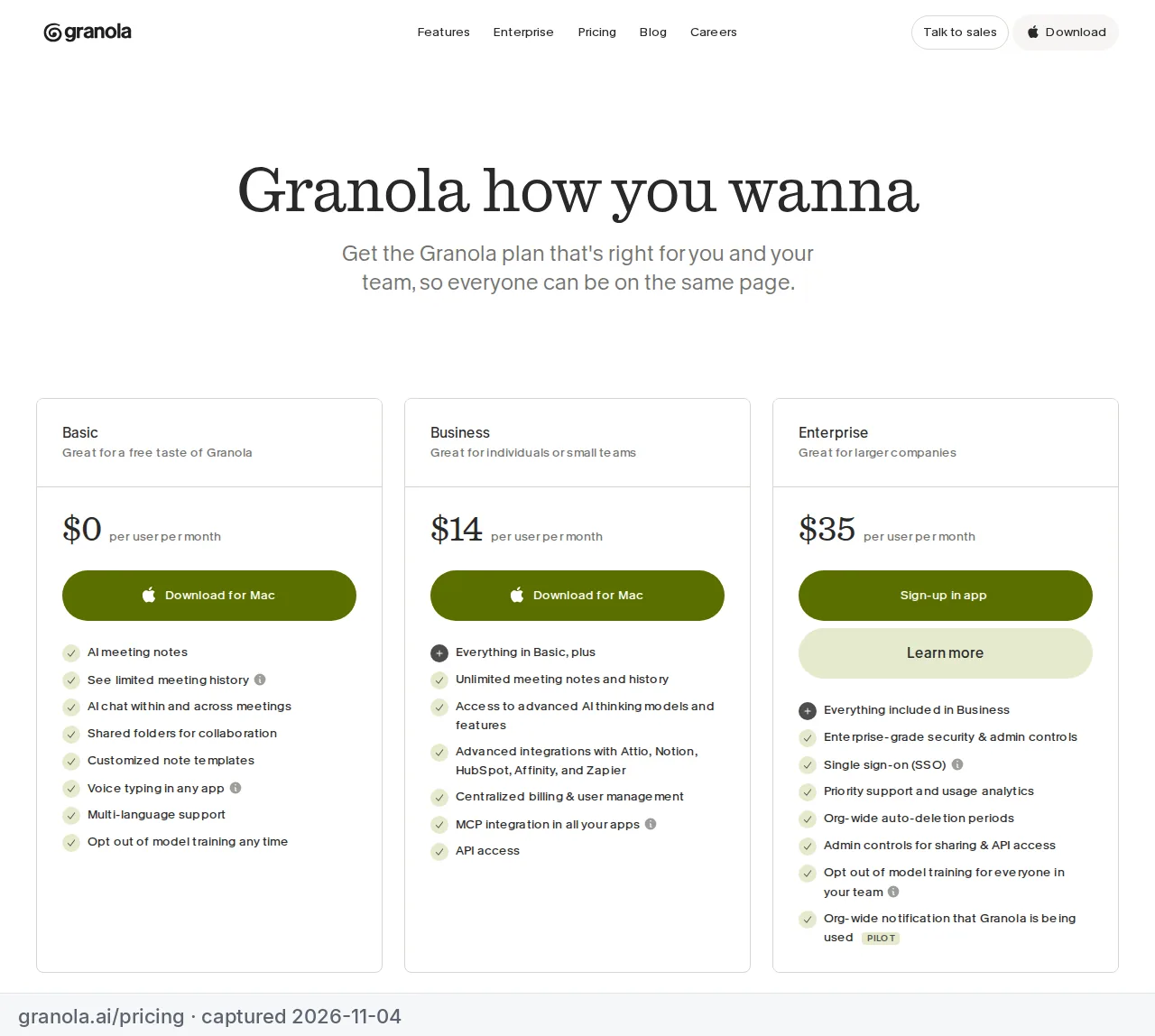
Where it runs out: history. Basic keeps only the last 30 days of meetings, so you can't go back to a call from two months ago. On Basic, AI chat uses Granola's automatic model only, and the only integration is Slack. Notion, Zapier and HubSpot need Business, at $14 per user a month. Granola's pricing page lists one price for Business, with no separate annual price.
Worth it for consultants on client calls where a visible bot feels awkward, as long as you copy what you need out of each note within a month. Skip it if you want a permanent, searchable archive without paying.
3. tl;dv: best for long-term recording at $0
tl;dv
AI meeting recorder and notetaker for Zoom, Meet and Teams
- Best for
- Remote teams that want searchable recordings
- Pricing
- Free plan; Pro €18/user/mo annual or €29 monthly; Business €29/user/mo annual or €39 monthly
- Free plan available
- Annual billing cuts Pro from €29 to €18 a month
- Prices are in EUR
- Paid plans are per seat
tl;dv's free plan includes unlimited video recordings, unlimited transcription in more than 30 languages, unlimited recording storage and unlimited workspace members, according to its pricing page. It records Zoom, Google Meet and Teams through a bot, and there are mobile apps for iOS and Android.
Where it runs out: the AI. Full AI meeting notes cover your first 10 meetings, and Ask AI queries are capped too. Free recordings are kept for up to 3 months, each recording can run up to 3 hours, and you can upload up to 5 files. Pro, at $18 per seat a month on annual billing, gives you AI notes on every meeting and unlimited Ask AI within a single meeting. Asking across several meetings stays capped at 5 queries until Business.
Worth it for teams that want every call recorded and transcribed for free, and are happy to read transcripts once the AI notes run out. Skip it if you want an AI summary of every meeting without paying.
4. Otter.ai: best for short calls and in-person notes
Otter.ai
AI meeting notes and real-time transcription
- Best for
- Solo consultants who need transcripts of many short calls
- Pricing
- Free plan (300 min/mo); Pro $8.33/mo annual or $16.99 monthly; Business $19.99/user/mo annual or $30 monthly
- Free plan with 300 minutes a month
- Pro includes 1,200 minutes a month and 90-minute conversations
- Business has unlimited meeting minutes
- Free plan caps conversations at 30 minutes
- Free plan allows only 3 lifetime file imports
Otter's free Basic plan gives you 300 transcription minutes a month, live transcription, speaker identification and iOS and Android apps, according to Otter's pricing page. OtterPilot can join Zoom, Teams and Google Meet calls, and you can record in-person conversations on your phone.
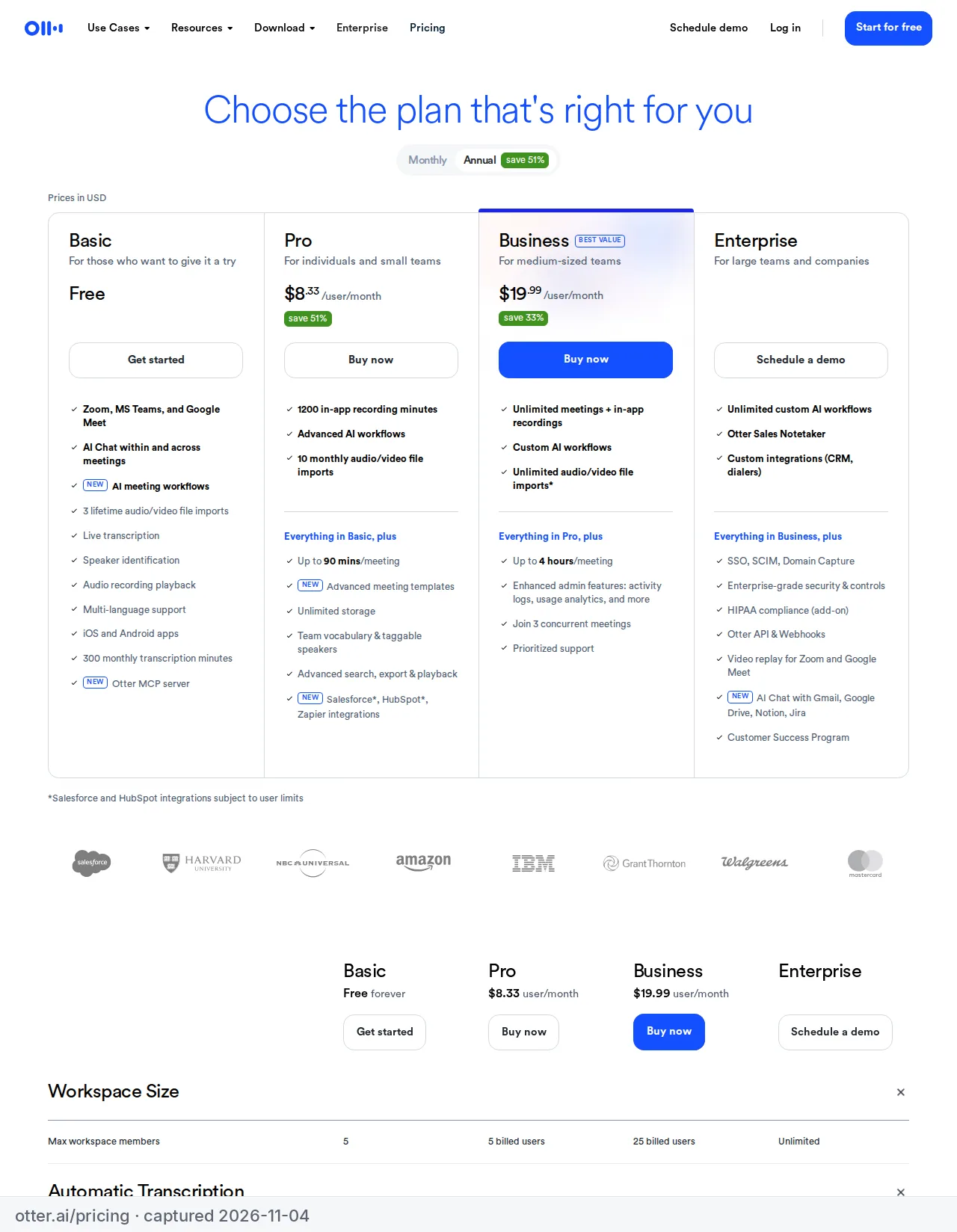
Where it runs out: fast, if your calls are long. Each conversation stops at 30 minutes on Basic. Only your 25 most recent conversations are kept, AI Chat allows 20 questions a month (3 per conversation), and you can import only 3 audio or video files for the life of the account. Pro costs $8.33 per user a month on annual billing and raises the limits to 1,200 minutes a month, 90 minutes per meeting and unlimited history.
Worth it for quick check-ins, interviews under half an hour and in-person notes. Skip it if your client calls regularly run an hour, because Basic will stop recording halfway through. For a closer look, read Fireflies vs Otter.
5. Tactiq: best lightweight option for Chrome
Tactiq
Live transcripts and AI summaries for Google Meet, Zoom and Teams
- Best for
- Individuals who want a lightweight transcript tool
- Pricing
- Free plan (10 transcripts/mo); Pro $8/mo annual; Team $16.67/user/mo annual
- Free plan with 10 transcripts a month
- Pro includes unlimited transcripts
- Free plan includes only 5 AI credits a month
- Monthly-billing prices not shown on the pricing page
Tactiq is a Chrome extension that transcribes Google Meet, Zoom and Microsoft Teams calls. Tactiq's homepage says "no bot joins call", so it's a quiet option if you're on calls in the browser. The free plan is for one user and includes 10 transcripts a month, 5 AI credits a month, AI-generated insights, in-meeting AI, and sharing and exporting transcripts.
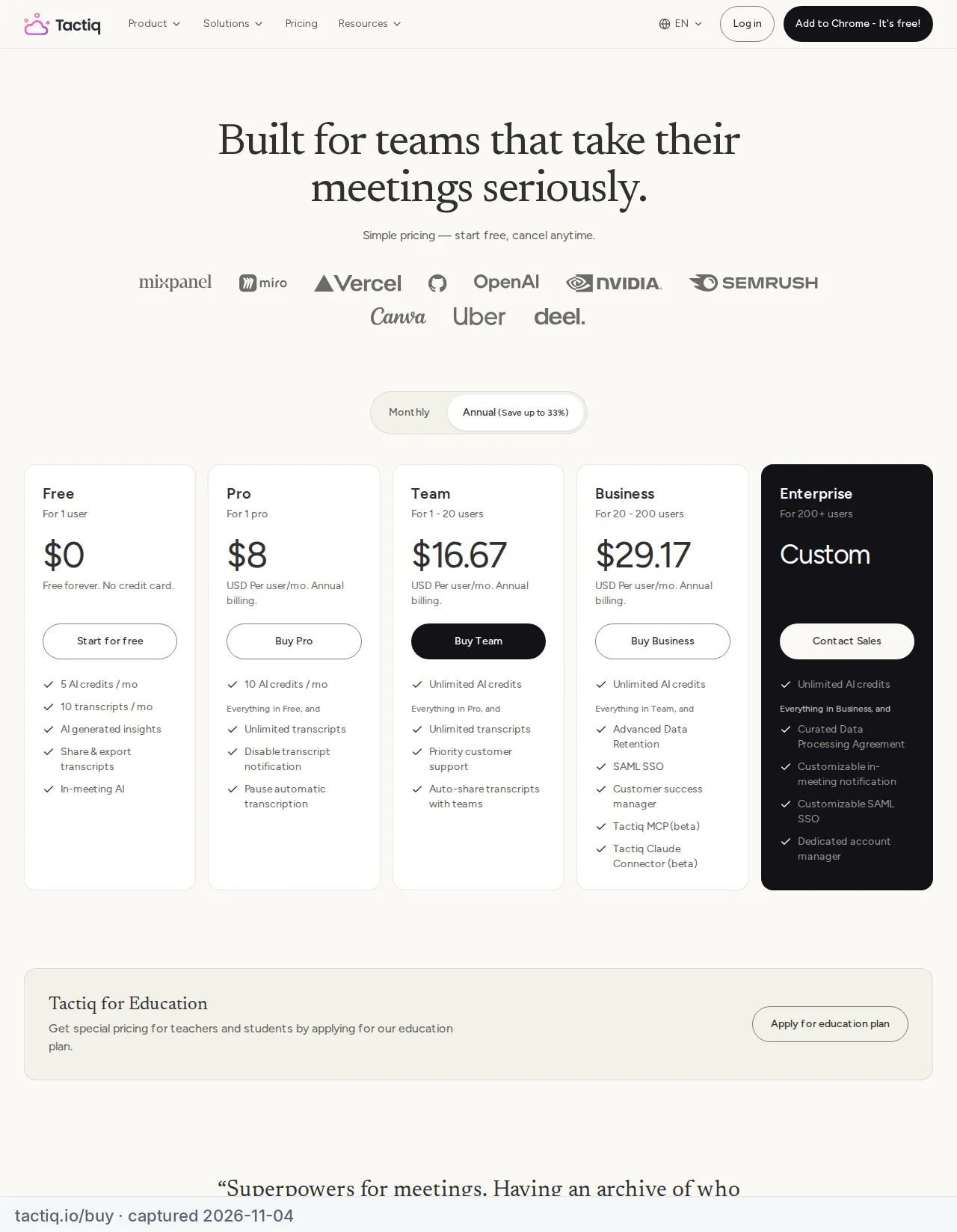
Where it runs out: at 10 transcripts a month, which is about two calls a week. Five AI credits a month means only a handful of summaries or action-item lists. Pro costs $8 per user a month on annual billing, with unlimited transcripts and 10 AI credits a month.
Worth it for people with a few browser-based calls a week who want a transcript without a bot. Skip it if you take meetings in a desktop app or on your phone, or need more than 10 transcripts a month.
6. Fireflies.ai: a free trial of a strong paid plan
Fireflies.ai
AI notetaker that joins your calls and transcribes them
- Best for
- Small teams that want shared, searchable meeting notes
- Pricing
- Free plan; Pro $10/user/mo annual or $18 monthly; Business $19/user/mo annual or $29 monthly
- Free plan available
- Paid plans add higher transcription credits
- Business adds analytics, private channels and video recording
- Paid plans are charged per seat
- Enterprise is annual-only ($39/user/mo)
Fireflies is our top pick for small teams in our roundup of the best AI meeting assistants, but its free plan is the most limited here for regular use. According to its pricing page, Free includes transcription in more than 100 languages, meeting search, the AskFred assistant, file uploads, desktop and mobile apps, and a Chrome extension that can record without the Fireflies bot.
Where it runs out: storage. Free gives 400 minutes of storage for the whole team, not per person. That's under seven hours of meetings in total before you need to delete old ones. AI summaries are limited on Free, recordings stop at 2 hours, and you get 20 AI credits. Pro costs $10 per seat a month on annual billing or $18 monthly, with unlimited AI summaries and 8,000 minutes of storage per seat.
Worth it for a team that wants to try Fireflies' shared search before paying for Pro. Skip it if you want a free plan to rely on long term: Fathom or tl;dv will last longer.
What the cheapest upgrade costs
When a free plan stops being enough, here's what the first paid plan costs per user per month on annual billing, from each vendor's pricing page on November 4, 2026.
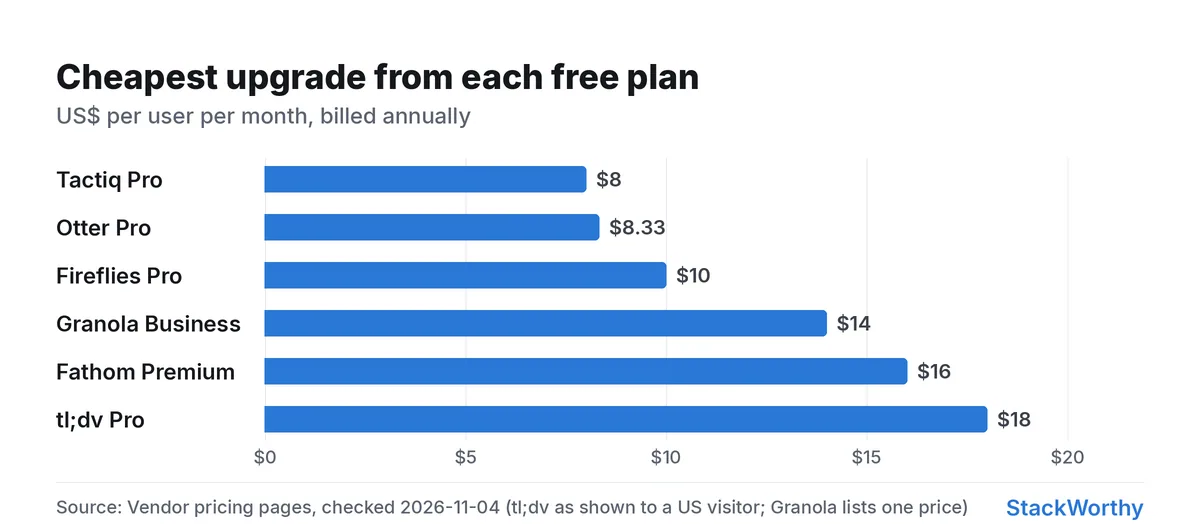
| Upgrade | Per user per month (annual) | What it fixes |
|---|---|---|
| Tactiq Pro | $8 | Unlimited transcripts |
| Otter Pro | $8.33 | 90-minute meetings, 1,200 min/mo, unlimited history |
| Fireflies Pro | $10 | Unlimited AI summaries, 8,000 min storage per seat |
| Granola Business | $14 | Unlimited history, Notion and Zapier integrations |
| Fathom Premium | $16 | AI action items, advanced summaries |
| tl;dv Pro | $18 | Unlimited AI notes, unlimited uploads |
When is it worth paying? When the limit gets in the way of your work, not before. If you only lose access to calls you never revisit, stay free. If a 30-minute cutoff, a full storage cap or missing action items costs you a follow-up with a client, the upgrade pays for itself quickly.
Which one should you choose?
| If you… | Choose |
|---|---|
| want unlimited free recording with AI summaries | Fathom |
| don't want a bot on client calls | Granola (or Tactiq in Chrome) |
| want every call kept for months and can live without AI notes | tl;dv |
| mostly have calls under 30 minutes, or record in person | Otter.ai |
| take a few browser-based calls a week | Tactiq |
| plan to buy a team plan and want to try it first | Fireflies.ai |
Comparing paid plans for a team? Read the best AI meeting assistants for small teams, with what a 3- or 5-person team actually pays.
Get the StackWorthy briefing
One short email when tools worth your money change. No spam.
Frequently asked questions
Which free AI note-taker has no meeting limit?
Fathom's free plan includes unlimited recordings and transcriptions, with AI summaries. tl;dv also offers unlimited recordings and transcription for free, but full AI notes cover only your first 10 meetings.
Which free AI note-taker works without a bot joining the call?
Granola records your device's audio with no bot on every plan, and Tactiq's Chrome extension transcribes without a bot. Fathom offers bot-free capture in beta on Mac, and Fireflies' Chrome extension can record without its bot.
Does the free plan keep my meeting history?
It depends on the tool. Granola's free plan keeps 30 days of history, Otter's keeps your 25 most recent conversations, tl;dv keeps recordings for up to 3 months, and Fireflies' free plan stops at 400 minutes of storage for the whole team. Fathom lists unlimited storage.
When is it worth paying for an AI note-taker?
When the free limit gets in the way of your work: calls cut off at 30 minutes, storage fills up, or you need action items sent to your task tool. The cheapest upgrades start at $8 to $10 per user a month on annual billing.